

TL;DR: Key Takeaways on Mutual Fund KYC Status Online
If you are worried about your SIPs and need the facts fast, here is your quick summary:
- The Scam Alert: Fraudsters are sending fake SMS and WhatsApp messages threatening to freeze your mutual funds. Never click links or download screen-sharing apps from these messages.
- The Rule Change: SEBI now requires your KYC to be “Validated” using Aadhaar. If your old KYC was done using non-Aadhaar documents (like a utility bill), your status might be “On Hold.”
- The Safe Way to Check: Only check your KYC status on official KRA (KYC Registration Agency) websites like CVL, NDML, CAMS, or KFintech.
- The 3 Statuses: Your KYC will either show as Validated (Perfect), Registered (Good for old funds, but needs an update for new ones), or On Hold (Your SIPs might fail; action required).
- The Fix: If your KYC is on hold, do not reply to an SMS. Log into your official broker app (like Zerodha or Groww) or the mutual fund’s official website to re-do your KYC digitally via Aadhaar.
Introduction
If you have been investing in mutual funds through SIPs, you know the feeling of watching your wealth grow over time. It is a satisfying, responsible feeling. But recently, a new wave of panic has been sweeping through the Indian investor community.
Millions of investors are waking up to terrifying SMS messages and WhatsApp alerts that say: “Dear Customer, your Mutual Fund KYC is incomplete. Your SIPs will be blocked in 24 hours. Click this link immediately to update.”
If you receive a message like this, your first instinct is to panic and click the link. After all, nobody wants their hard-earned investments to be frozen. But wait! That link might not be from your mutual fund company. It could be from a highly sophisticated scammer sitting hundreds of miles away, waiting to drain your bank account.
The rules around Know Your Customer (KYC) have changed significantly over the last couple of years, creating confusion. Scammers are weaponizing this confusion to steal from honest investors.
In this comprehensive, easy-to-understand guide, we are going to expose exactly how these KYC scams work. More importantly, we will give you a simple, 5-step action plan to safely check your official KYC status online, so you never have to worry about a fake SMS again.
1. Why is Everyone Panicking About Mutual Fund KYC in 2026?
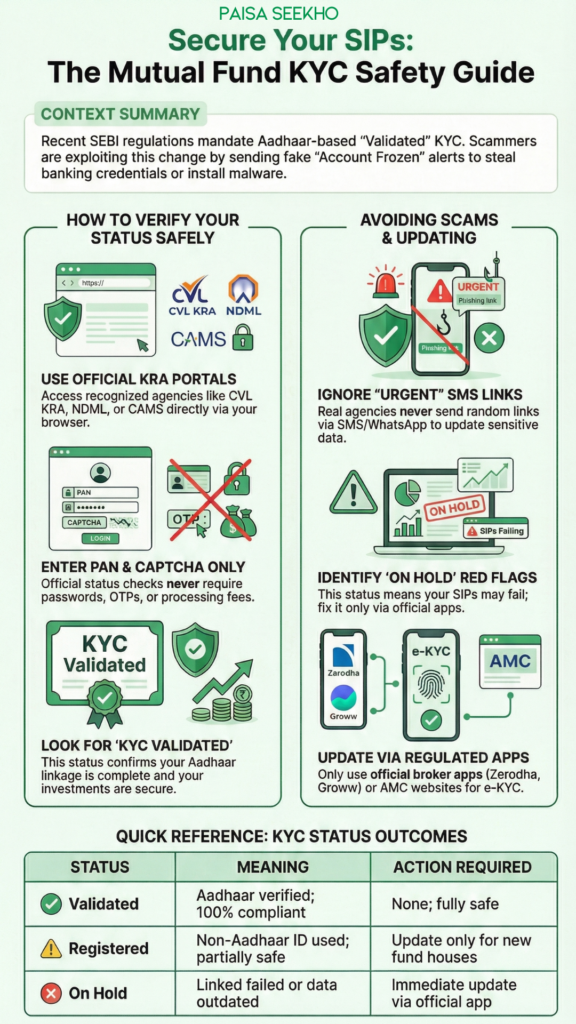
To understand the scams, you have to understand the rule changes that caused the confusion in the first place.
KYC stands for “Know Your Customer.” It is a mandatory process by the Securities and Exchange Board of India (SEBI) to prevent money laundering and fraud. In the past, you could complete your mutual fund KYC using almost any government ID—a passport, a voter ID, a driving license, or even a simple bank statement.
However, the government recently tightened the security. To create a flawless, unified financial system, SEBI mandated that Aadhaar and PAN linkage is the ultimate gold standard.
If your original KYC was done five years ago using an old electricity bill, the system no longer considers it fully verified. Millions of legitimate investors suddenly had their KYC status downgraded from “Approved” to “On Hold” or “Registered.” If your status is “On Hold,” your ongoing SIPs could actually be paused, and you will not be allowed to withdraw your money until you update it.
This genuine, massive regulatory change created chaos in the market—and scammers love chaos.
2. Mutual Fund KYC Scam: How Fraudsters Steal Your Money
Fraudsters know that Indian investors are confused and terrified of their accounts being blocked. They use a tactic called “Phishing” combined with “Urgency.” Here is exactly how the scam plays out:
Step 1: The Threatening SMS
You receive a message that looks highly official. It might say “URGENT from CAMS” or “SEBI Alert.” The message warns you that your PAN-Aadhaar linking has failed and your account will be permanently frozen by midnight.
Step 2: The Malicious Link
The message contains a blue link. Because you are scared, you click it. It takes you to a fake website that looks exactly like the official Income Tax portal or a mutual fund website.
Step 3: The Data Theft (or the App Trap)
On this fake website, they ask you to type in your PAN card, Aadhaar number, and your bank account details “for verification.”
In more advanced scams, they might ask you to download a “KYC Helper App” (which is actually a screen-sharing app like AnyDesk). The moment you download this app, the scammer can see your phone screen. They initiate a massive transfer from your bank account, watch the OTP arrive on your screen, type it in, and steal your money before you even realize what happened.
The Golden Rule: A legitimate mutual fund company, KRA, or SEBI will never send you an SMS with a random link asking you to download an app to update your KYC.
3. The 5-Step Guide: How to Safely Check Your KYC Status
If you get a warning message, delete it. If you genuinely want to know the status of your mutual fund KYC, you must go directly to the source.
The source is a KYC Registration Agency (KRA). These are government-authorized companies that hold your verified data. The most common ones are CVL KRA, NDML, CAMS, Karvy (KFintech), and DotEx.
Here is how you check your status safely in under two minutes:
Step 1: Open an Official KRA Website
Open your computer or mobile browser and type in the official URL of a recognized KRA. The most popular and reliable one is www.cvlkra.com.
Step 2: Find the “KYC Inquiry” Button
On the homepage, look for a tab or button that says “KYC Inquiry” or “Check KYC Status.” Click on it.
Step 3: Enter Your PAN Details
The system will ask for your 10-digit Permanent Account Number (PAN). Enter it carefully. You do not need to enter a password or an OTP just to check the status.
Step 4: Verify the Captcha
Check the “I am not a robot” box or enter the simple math captcha shown on the screen, and click “Submit.”
Step 5: Read Your Status Result
The screen will instantly display a table showing your name, the date your KYC was last modified, and your current “KYC Status.”
4. Understanding Validated vs. Registered vs. On Hold
When the result pops up on the KRA website, you will likely see one of three distinct words. Understanding what these words mean is the key to protecting your investments.
Status 1: “Validated” (You are 100% Safe)
If your status says “KYC Validated,” congratulations! This means your KYC was completed using your Aadhaar card, and your mobile number and email ID are perfectly verified. You do not need to do anything. Your SIPs will continue smoothly, and you can open new mutual fund accounts anywhere in India without any hassle.
Status 2: “Registered” (You are Partially Safe)
If your status says “KYC Registered,” it means your KYC is verified, but it was done using a non-Aadhaar document (like a Passport or Voter ID).
- The Good News: Your existing mutual fund SIPs are completely safe and will continue without interruption. You can also withdraw your money anytime.
- The Catch: If you want to start a brand new SIP with a new mutual fund company that you have never invested in before, you will be forced to update your KYC to “Validated” using Aadhaar.
Status 3: “On Hold” or “Rejected” (Action Required)
If your status says “On Hold,” you have a problem. This usually happens if your PAN and Aadhaar are not linked, or if the email and mobile number you provided years ago are no longer active.
If your status is on hold, your financial transactions are frozen. Your upcoming SIP installments will bounce, and you will not be allowed to redeem (sell) your mutual funds. You must fix this immediately.
5. How to Safely Update Your KYC (Without Getting Scammed)
If you discover that your status is “Registered” and you want to upgrade it, or if it is “On Hold” and you desperately need to fix it, do not search for random agents on the internet.
Here is the 100% safe, scam-proof way to update your KYC:
Method A: Use Your Official Stockbroker App
If you invest through modern, regulated apps like Zerodha (Coin), Groww, Upstox, or Angel One, simply open their official app. Navigate to your “Profile” or “Account Settings.” If your KYC needs updating, the app will have a massive notification prompting you to do an “Aadhaar e-KYC.” You will complete the process securely within their app using an OTP sent from the official UIDAI (Aadhaar) server.
Method B: Use the Official AMC Website
If you invest directly with the mutual fund companies (like SBI Mutual Fund, HDFC Mutual Fund, or Nippon India), go directly to their official website. Log into your account and look for the “Update KYC” section. They will guide you through a secure video-KYC or Aadhaar-based digital update.
Method C: The CAMS / KFintech Portals
CAMS and KFintech are the massive backbone servers for almost all mutual funds in India. You can visit the official www.camsonline.com or www.mfs.kfintech.com. They have dedicated, highly secure portals specifically designed to help investors re-validate their KYC online in less than five minutes.
Conclusion: Keep Your Guard Up
As India’s stock market continues to hit new record highs, the mutual fund industry is attracting millions of first-time investors. Unfortunately, where the money goes, the criminals follow.
The rules regarding KYC might seem annoying and bureaucratic, but they are designed to build a massive fortress around your life savings. By moving everyone to an Aadhaar-validated system, SEBI is ensuring that nobody can secretly open a bank account in your name or steal your identity.
Your job as a smart investor is to stay calm. The next time your phone buzzes with a threatening message about your mutual funds being blocked, you know exactly what to do. Delete the message, open the official CVL KRA website, type in your PAN, and check the facts for yourself. Your wealth is hard-earned; protect it with knowledge.
Frequently Asked Questions
Q1: How can I safely check my mutual fund KYC status online?
The safest way is to visit the official website of a KYC Registration Agency (KRA), such as www.cvlkra.com or www.ndml.in. Simply click on the “KYC Inquiry” tab, enter your PAN number, and the screen will securely display your current status without requiring any OTP or passwords.
Q2: What should I do if I get an SMS saying my mutual fund KYC is suspended?
Do absolutely nothing with the SMS. Do not click any links, and do not call the phone number provided in the message. This is a classic phishing scam. Independently verify your status on the official KRA website. If it actually needs updating, log into your official broker app to fix it.
Q3: What does “KYC Validated” mean for my mutual funds?
“Validated” is the best status you can have. It means your KYC was successfully completed and verified using your Aadhaar card as the official proof of identity and address. Your account is 100% compliant, and you can freely invest in any mutual fund in India.
Q4: My KYC status shows as “Registered.” Will my existing SIPs stop?
No, your existing SIPs are perfectly safe and will not be stopped. A “Registered” status simply means your KYC was done using a non-Aadhaar document (like a Voter ID). While your old investments are safe, you will need to upgrade to Aadhaar “Validated” if you want to invest in a completely new mutual fund company.
Q5: Why did my perfectly fine mutual fund KYC suddenly go “On Hold” in 2026?
The most common reason for a KYC status to suddenly switch to “On Hold” is a failure to link your PAN card with your Aadhaar card before the government deadline. It can also happen if the KRA’s emails or SMS alerts to your registered contact details are continuously bouncing back as undeliverable.
Q6: Can I update my KYC to “Validated” completely online?
Yes. You do not need to visit a physical office. You can update your KYC completely online through your authorized stockbroker’s app (like Groww or Zerodha), the official website of your mutual fund AMC, or through the secure CAMS/KFintech web portals using an Aadhaar-based OTP or a quick Video-KYC process.
Q7: How do mutual fund KYC scams usually steal money from investors?
Scammers send fake links that lead to fraudulent websites designed to steal your PAN and banking details. Worse, they often convince panicked investors to download a “KYC Support App,” which is actually screen-sharing malware. Once installed, the scammer watches your screen, steals your bank OTPs, and drains your account.
Q8: Does it cost money to update my KYC status?
No. Updating or modifying your KYC details for mutual funds is a completely free service provided by the KRAs, AMCs, and regulated brokers. If anyone asks you to pay a “processing fee” to unlock your KYC, it is a guaranteed scam.
Q9: Do I have to do a separate KYC for every mutual fund company I invest with?
No. India uses a centralized KYC system for the securities market. Once your KYC is “Validated” by any one KRA, that single KYC record is shared across all mutual fund companies (AMCs), stockbrokers, and depository participants across the country.
Q10: What documents do I need to keep ready before updating my KYC online?
To quickly complete a digital KYC update, you should have your physical PAN card, your Aadhaar card number, a blank piece of white paper with your signature on it (for photo capture), and ensure that the mobile number linked to your Aadhaar card is active so you can receive the mandatory verification OTP.