

Getting your Goods and Services Tax Identification Number (GSTIN) feels like a massive entrepreneurial milestone. You download the certificate, you update your invoice templates, and you finally look like a “legitimate” business to your corporate clients.
But about three weeks later, the compliance hangover kicks in.
You start receiving automated SMS alerts from the tax department reminding you that your “GSTR-1 due date is approaching.” You log into the portal and are immediately bombarded by an alphabet soup of forms: GSTR-1, GSTR-2A, GSTR-2B, GSTR-3B, CMP-08. Panic sets in. You assume you have accidentally triggered a massive tax audit, and you consider paying a third-party agency ₹3,000 a month just to make the notifications stop.
Take a deep breath.
The Indian GST system was designed for massive corporations with thousands of daily transactions, but the government has actively built streamlined workflows for small businesses, freelancers, and digital creators. Filing your returns is not a test of your accounting skills; it is simply a test of your organizational habits.
If you apply a basic systems-thinking approach, GST filing simply becomes a 30-minute monthly data-entry chore. This ultimate 2026 guide will decode exactly what each form means, how to claim your tax credits legally, the penalties you must avoid, and the exact click-by-click workflow to file your returns for free on the official portal.
2. Decoding the Alphabet Soup: The Core GST Forms
Before you can file anything, you must understand how the GST ecosystem actually works. The government essentially crowd-sources tax tracking. They track what you sold, match it against what your clients bought, and calculate the difference.
To do this, you only need to master three primary components:
GSTR-1: Your Outward Supplies (What You Sold)
Think of GSTR-1 as your “Sales Register.” This is the form where you tell the government exactly who you billed, how much you charged them, and how much GST you collected on their behalf.
- B2B Invoices (Business to Business): If you are a freelance video editor and you bill a corporate marketing agency, you must enter their GSTIN, your invoice number, the taxable value, and the GST amount. This is crucial because your client needs this data to claim their tax credits.
- B2C Invoices (Business to Consumer): If you run a D2C clothing brand and sell shirts to regular people without GST numbers, you do not need to upload every single invoice. You simply upload a consolidated summary of your total B2C sales for the month, broken down by state.
- Export Invoices: If you are billing clients in the US or UK under a Letter of Undertaking (LUT), you declare those “zero-rated” sales here.
GSTR-2B: Your Auto-Drafted ITC Statement (What You Bought)
You do not file GSTR-2B. The government generates it for you. This is the most critical document for saving money in 2026.
- How it works: When you buy a new MacBook for your agency or pay for an Adobe Creative Cloud subscription using your business GSTIN, Apple and Adobe file their own GSTR-1s. Because they listed your GST number, the government’s supercomputer auto-populates that tax data into your GSTR-2B statement.
- The 2026 Strict Rule: GSTR-2B is a static, non-editable document generated on the 14th of every month. Under the latest strict compliance rules, if a purchase invoice does not appear in your GSTR-2B (meaning your vendor forgot to file their returns), you cannot claim the Input Tax Credit (ITC) for that month. You have to wait until they fix their compliance!
GSTR-3B: The Final Summary & Payment
GSTR-3B is where the actual math happens and money changes hands. It is a self-declared summary return.
- The Equation: GSTR-3B looks at the total tax you collected from your clients (from your GSTR-1) and subtracts the total tax you paid on your business expenses (from your GSTR-2B).
- The Result: The remaining balance is your “Net Tax Liability.” You must generate a payment challan, pay this exact amount to the government via UPI or NetBanking, and then officially submit the GSTR-3B form using an Aadhaar OTP.
3. The QRMP Scheme: The Freelancer’s Secret Weapon
If you read the section above and thought, “I have to do this every single month?” — do not panic.
If your annual turnover is under ₹5 Crores (which covers 99% of solo freelancers, digital creators, and boutique agencies), the government offers a massive compliance relief program called the Quarterly Return Filing and Monthly Payment of Taxes (QRMP) Scheme.
Why You Must Opt-In to QRMP
Under the standard system, you must file GSTR-1 and GSTR-3B every single month. That is 24 returns a year.
If you opt into the QRMP scheme, you only file your GSTR-1 and GSTR-3B once every three months (quarterly). This reduces your yearly filing burden from 24 returns down to just 8!
The IFF (Invoice Furnishing Facility) Loophole
Wait, you might ask, if I only file my sales quarterly, won’t my B2B corporate clients get angry because they have to wait three months to claim their Input Tax Credit?
The government solved this with the IFF. Under the QRMP scheme, for the first two months of the quarter, you are given an optional Invoice Furnishing Facility (IFF).
- If you bill a massive corporate client in Month 1, you can simply log into the IFF and upload just that one specific B2B invoice so your client gets their tax credit immediately.
- You can completely ignore your small B2C sales until the end of the quarter.
How Do I Pay Tax Under QRMP?
Even though you file returns quarterly, the government still wants its money monthly. Under QRMP, for the first two months of the quarter, you simply generate a PMT-06 challan and pay an estimated tax amount (either a self-assessed amount or a flat 35% of your previous quarter’s cash liability). You then settle the final exact math when you file your quarterly GSTR-3B.
The Paisaseekho Verdict: If you are a small business owner, logging into the GST portal (Services > Returns > Opt-in for Quarterly Return) should be the very first thing you do after getting your GSTIN.
4. The Step-by-Step Filing Workflow (How to Actually Do It)
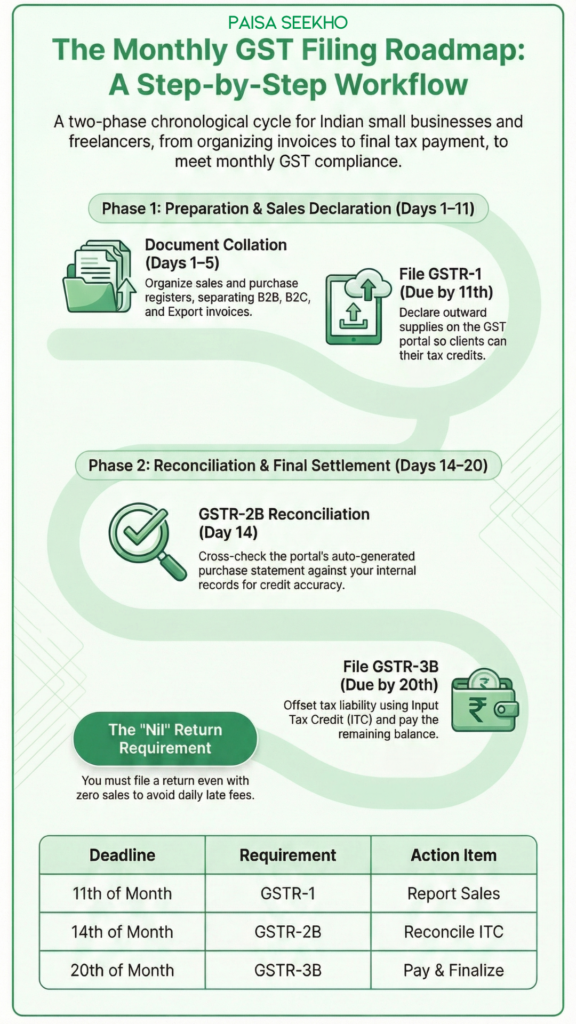
Let’s map out the exact workflow. Assuming you are on the standard monthly filing system (to understand the full cycle), here is the step-by-step process you must execute every single month.
Step 1: Document Collation (Days 1 to 5)
Filing GST is 90% preparation and 10% execution. By the 5th of the month, you should sit down and organize your records for the previous month.
- Sales Register: Compile every invoice you issued. Separate them into B2B (with client GSTINs), B2C (regular consumers), and Exports.
- Purchase Register: Gather all the tax invoices for your business expenses (software subscriptions, co-working space rent, professional camera gear).
Step 2: Filing GSTR-1 (Due by the 11th)
You must declare your sales before the 11th of the month so your clients can receive their tax credits.
- Log into gst.gov.in.
- Navigate to Services > Returns > Returns Dashboard. Select the correct financial year and month.
- Click Prepare Online under the GSTR-1 tile.
- B2B Invoices (Table 4A): Add your corporate invoices one by one. Enter the client’s GSTIN, invoice value, and the exact tax breakdown (IGST for out-of-state, CGST/SGST for in-state).
- B2C Invoices (Table 7): Enter the consolidated sum of your consumer sales, organized by state.
- HSN Summary (Table 12): You must provide a summary of your sales based on their HSN (goods) or SAC (services) codes.
- Click Generate Summary, review the data, and click File Statement. Verify the filing using your Aadhaar-linked OTP (Electronic Verification Code – EVC).
Step 3: The 2B Reconciliation (Day 14)
On the 14th of the month, the portal will automatically generate your GSTR-2B statement.
- Go back to the Returns Dashboard and download your GSTR-2B.
- The Matching Game: Cross-check the GSTR-2B statement against the purchase register you created in Step 1.
- If you bought a ₹1 Lakh camera and the ₹18,000 GST is clearly visible in your GSTR-2B, you are good to go! If the invoice is missing, you must call the camera store immediately and tell them to fix their GST returns, otherwise you cannot claim that ₹18,000 credit this month.
Step 4: Filing GSTR-3B (Due by the 20th)
This is the grand finale where you pay your dues.
- Click Prepare Online under the GSTR-3B tile.
- Because the portal has been heavily automated by 2026, the system will automatically pull your sales data from your GSTR-1 and your eligible ITC data from your GSTR-2B to auto-draft your GSTR-3B.
- Verify the Auto-Draft: Check the pre-filled numbers. Ensure your outward tax liability matches your records and that your ITC matches the GSTR-2B statement.
- Make the Payment: Click “Proceed to Payment.” The system will automatically offset your tax liability using your available Input Tax Credit. If there is a shortfall, it will prompt you to create a challan.
- Pay the cash balance via UPI, NEFT, or NetBanking.
- Click File GSTR-3B and verify with your OTP.
Congratulations, you are fully compliant for the month!
5. The Nil Return Trap (The ₹0 Revenue Month)
This is the most common reason young freelancers end up with suspended GST accounts and massive fines.
Let’s say you take a one-month vacation in December. You do zero client work, issue zero invoices, and have zero business expenses. You assume that because you made no money, you don’t have to deal with taxes, so you completely ignore the GST portal.
This is a massive, expensive mistake.
Under Indian tax law, if you hold an active GST registration, filing returns is unconditionally mandatory, regardless of your business activity. If you have absolutely no sales and no purchases to report, you must file a Nil Return.
The SMS Nil Filing Hack
The government knows that logging into the portal just to type “0” in every box is annoying. To make compliance effortless, they introduced SMS filing. If you have zero data to report for the month, you can file your Nil GSTR-1 and Nil GSTR-3B in ten seconds directly from your registered mobile phone!
- To file a Nil GSTR-1: Send an SMS to 14409 in this format: NIL 1 [Your 15-digit GSTIN] [Tax Period as MMYYYY] (e.g., NIL 1 07XXXXX1234X1Z1 122025).
- The system will reply with a 6-digit code.
- Confirm it by sending: CNF 1 [6-digit code].
- Repeat the exact same process for your 3B by changing the number 1 to 3B (e.g., NIL 3B 07XXXXX1234X1Z1 122025).
Do not skip this step. A 10-second text message will save you thousands of rupees in penalties.
6. The Price of Laziness: Penalties and Late Fees
The GST network is entirely run by algorithms. There is no human tax officer reviewing your case who might take pity on you because you were busy. The moment the clock strikes midnight on your due date, the system automatically triggers financial penalties.
If you miss your deadlines, here is exactly how much it will cost you in 2026:
1. The Daily Late Fee (The Slow Bleed)
For both GSTR-1 and GSTR-3B, if you file past the due date, the system automatically levies a late fee of ₹50 per day (₹25 CGST + ₹25 SGST) for regular returns, and ₹20 per day for Nil returns. While ₹50 doesn’t sound like much, if you forget to file your returns for 6 months while focused on building your business, you will suddenly owe the government nearly ₹10,000 just in late filing fees before you even calculate your actual tax liability!
2. Interest on Late Payment
If you file your GSTR-3B late, or if you file it on time but delay paying the actual cash tax you owe, the government charges a heavy 18% per annum interest rate on the outstanding tax amount. This interest is calculated daily from the due date until the date you actually make the payment.
3. The Ultimate Penalty: ITC Blockage & Cancellation
If you consistently fail to file your GSTR-3B for consecutive tax periods (usually two months or one full quarter under QRMP), the algorithm will automatically block your E-Way Bill generation (paralyzing your ability to ship physical goods) and block your ability to file your GSTR-1.
If you ignore the warnings and fail to file for six consecutive months, the tax officer has the legal authority to unilaterally suspend and cancel your GST Registration. Getting a cancelled GSTIN revoked is a massive legal headache that requires paying all pending dues, maximum late fees, and filing a formal appeal.
7. Conclusion: Build Your Compliance System
GST return filing is only intimidating until you do it for the first time. Once you understand the rhythm of the portal, it becomes a predictable, monthly administrative habit.
If you want to focus entirely on scaling your agency or growing your brand, rely on systems, not your memory.
- Set a recurring calendar alarm for the 7th of every month to collate your invoices.
- Set a second alarm for the 15th of every month to check your GSTR-2B and file your returns.
- Always maintain a separate “Tax Savings Account” where you park the 18% GST you collect from clients so you never accidentally spend the government’s money!
Your Next Step: If you have just received your GST number, immediately log into the portal and check if you are eligible to opt into the QRMP scheme. After that, make sure your accounting software (like Zoho Books, Tally, or clear GST software) is properly integrated to generate your B2B invoices automatically!
Top 15 Frequently Asked Questions
1. Can I file my GST returns myself without a CA?
Yes, absolutely. For most freelancers, service providers, and small e-commerce sellers with straightforward B2B and B2C invoices, the official GST portal is designed for self-service. If your accounting is clean, filing GSTR-1 and 3B takes less than 30 minutes. You only truly need a CA for complex manufacturing, reverse charge scenarios, or annual audits.
2. What is the due date for filing GSTR-1?
For taxpayers filing monthly, the deadline is the 11th of the following month (e.g., April’s GSTR-1 is due by May 11th). For taxpayers under the QRMP scheme, the quarterly GSTR-1 is due by the 13th of the month following the quarter.
3. What is the due date for filing GSTR-3B?
For monthly filers, the deadline is the 20th of the following month. For QRMP filers, the deadline is the 22nd or 24th of the month following the quarter, depending on the state in which your business is registered.
4. What happens if I make a mistake in my GSTR-1?
Unfortunately, under current Indian GST law, a return once filed cannot be revised or deleted. However, you can rectify the mistake (such as correcting a wrong invoice value or a wrong client GSTIN) in the GSTR-1 of the subsequent month using the “Amendment” tables on the portal.
5. Can I claim ITC if I don’t have the physical invoice?
No. To claim Input Tax Credit, you must possess the valid tax invoice, you must have actually received the goods or services, and crucially, the invoice details must reflect in your auto-generated GSTR-2B statement.
6. What is the difference between GSTR-2A and GSTR-2B?
GSTR-2A is a dynamic statement; it updates constantly whenever a vendor files a delayed return. GSTR-2B is a static statement generated on the 14th of every month. For calculating your eligible ITC for the current month’s GSTR-3B, you must strictly rely only on the static GSTR-2B.
7. Do I need a Digital Signature Certificate (DSC) to file returns?
If you operate a Private Limited Company or an LLP, a physical DSC USB token is mandatory to verify and file returns. If you are a Sole Proprietor, freelancer, or run a Partnership, you can easily verify your returns using an Aadhaar-linked OTP (called an EVC).
8. What is the Reverse Charge Mechanism (RCM)?
Normally, the seller collects GST and pays the government. Under RCM, the buyer is legally responsible for calculating the GST, paying it directly to the government, and then claiming the ITC. This applies to specific services like legal fees (advocates), goods transport agencies, and renting residential properties for commercial use.
9. How do I pay the GST late fee?
You cannot pay a late fee independently. The portal auto-calculates your late fee from the previous delayed month and forcibly adds it to your tax liability in your next GSTR-3B return. You must pay it via a standard cash challan before the system allows you to file the current return.
10. Can I offset my late fees using my Input Tax Credit (ITC)?
No. Input Tax Credit can only be used to pay your actual outward tax liability (IGST, CGST, SGST). Late fees, interest penalties, and RCM liabilities must always be paid using hard cash from your Electronic Cash Ledger (via your bank account).
11. What is an E-Way Bill and how does it relate to returns?
An E-Way Bill is a digital permit required to transport physical goods worth more than ₹50,000 across state lines. While it is a separate portal, the data from the E-Way bills you generate is automatically imported into your GSTR-1 dashboard to prevent tax evasion.
12. If my client doesn’t pay my invoice, do I still have to pay the GST?
Yes. The GST system operates on an accrual basis, not a cash basis. If you issue a tax invoice in March, you must declare it in your March GSTR-1 and pay the government the GST in your March GSTR-3B, regardless of whether your client takes 90 days to actually pay you.
13. How do I declare exports under GST?
If you export services (e.g., freelance coding for a US client), you must first apply for a Letter of Undertaking (LUT) on the portal. Once approved, you can bill your foreign clients without charging them any GST. You declare these invoices in Table 6A of your GSTR-1 as “Export without payment of tax.”
14. What is the composition scheme?
It is an alternative scheme for very small traditional businesses (like local retail shops or small restaurants) with a turnover up to ₹1.5 Crore. They don’t deal with ITC or standard returns; they simply pay a flat 1% to 5% tax on their total turnover and file a simplified quarterly statement (CMP-08). It is generally not suitable for B2B service freelancers or digital agencies.
15. Can I cancel my GST registration if I stop working?
Yes. If you shut down your business or return to a full-time salaried job, you must formally apply for cancellation of your GSTIN on the portal. However, the tax officer will only approve the cancellation if you have successfully filed all your pending returns (including Nil returns) up to the date of cancellation.
⚠️ Disclaimer
At Paisaseekho, our mission is to make you financially literate, not to act as your Chartered Accountant. The information provided in this article is for educational and informational purposes only and should not be construed as professional tax or legal advice. GST rules, portal interfaces, and penalty structures are subject to constant updates by the GST Council. We strongly recommend consulting with a registered CA or tax professional for highly complex supply chains, massive export volumes, or specific compliance disputes.