

Quick summary: When you open your AIS (Annual Information Statement), you will see a long list of categories, TDS/TCS, SFT, salary, dividend, and many more. Some of these names sound technical and confusing. This guide explains, in plain words, what each major category actually means and why it matters to you.
The Five Broad Sections of AIS
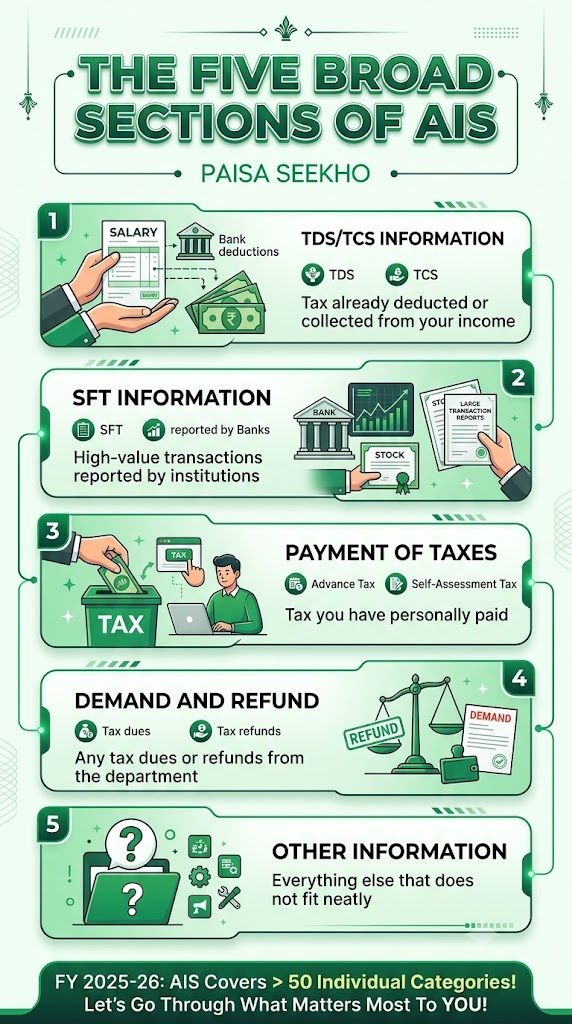
Before we go category by category, it helps to know that AIS is organised into five broad sections. Every specific category you see falls under one of these:
- TDS/TCS Information, tax already deducted or collected from your income
- SFT Information, high-value transactions reported by banks, brokers, and other institutions
- Payment of Taxes, tax you have personally paid, like advance tax
- Demand and Refund, any tax dues or refunds from the department
- Other Information, everything else that does not fit neatly into the first four
For FY 2025-26, AIS covers more than 50 individual categories under these five sections. Let us go through the ones that matter most to a regular taxpayer.
Section 1: TDS/TCS Information
This section shows every place where tax was already deducted or collected on your behalf during the year.
- TDS on Salary. Tax deducted by your employer from your monthly pay. This should match your Form 16.
- TDS on Interest. Tax deducted by a bank on your fixed deposit or recurring deposit interest, once it crosses the threshold limit.
- TDS on Rent. If you are a landlord and your tenant deducted tax before paying you rent, it shows up here.
- TDS on Professional or Technical Fees. If you are a freelancer or consultant, and a client deducted tax before paying your invoice, it appears here.
- TCS on Purchases. Tax collected by a seller when you buy certain goods, like a car above a certain value, or make a large payment under LRS, the scheme that lets you send money abroad.
- Why this matters: every entry here should have a matching credit in your Form 26AS. If something is missing from Form 26AS, you cannot claim it as a tax credit, even if it shows in AIS.
Section 2: SFT Information (Specified Financial Transactions)
SFT stands for Specified Financial Transaction. This is the section that tracks large, high-value transactions, the kind that usually get reported by banks, registrars, brokers, and mutual fund companies. Each entry has a short code, like SFT-004 or SFT-006, but you do not need to memorise the codes. Here is what the most common ones mean in plain language.
- Cash Deposits. Large cash deposits in your savings or current account. Banks report this once your deposits cross a certain amount in a year.
- Fixed Deposit Investments. If you put a large amount into an FD in one go, this gets reported too.
- Credit Card Payments. If your total credit card bill payments in a year cross a certain amount, this shows up here, whether you paid by cash or bank transfer.
- Purchase of Mutual Funds. If you invest a large amount into a mutual fund scheme, this is reported by the fund house or registrar.
- Purchase or Sale of Shares. Buying or selling listed company shares above a certain value gets reported by the stock exchange or your broker.
- Purchase of Immovable Property. If you buy a house, flat, or land above a certain value, the property registrar reports this.
- Sale of Immovable Property. Similarly, if you sell property, this shows up under SFT, and often connects to a capital gains entry as well.
- Foreign Currency Purchase. If you buy foreign currency or make an international remittance, sending money abroad, your bank reports this.
- Why this matters: SFT entries are how the tax department checks whether your big-ticket spending and investing matches the income you have declared. If you have a large SFT entry with no matching income explanation, it can raise questions.
Section 3: Payment of Taxes
This is a simpler section. It just shows the taxes you personally paid during the year, outside of what was deducted by someone else. The two main types are:
- Advance Tax. If your total tax liability for the year is expected to be above a certain amount, you are required to pay tax in instalments during the year itself, rather than all at once when filing your return. These instalment payments show up here.
- Self-Assessment Tax. Any extra tax you pay directly, usually just before or while filing your return, to cover a shortfall between what was deducted and what you actually owe.
- Why this matters: if you made these payments, this section confirms they are on record with the department. If a payment you made is missing here, it may not get credited properly when you file.
Section 4: Demand and Refund
This section is straightforward:
- Demand. If the tax department believes you owe additional tax from a past year, perhaps from an earlier assessment or notice, it shows up here as a “demand,” along with the assessment year it relates to.
- Refund. If you were owed a refund in a previous year, and it was processed and sent to you, the amount and year are shown here.
- Why this matters: checking this section helps you confirm whether an old demand is still pending, or whether a refund you were expecting has actually been issued.
Section 5: Other Information
This is the catch-all section, and it is where several genuinely important categories live. Here are the ones most people encounter.
- Salary Breakup (Annexure II data). This shows a more detailed breakdown of your salary, beyond just the total, drawing from the detailed salary annexure your employer files.
- Dividend Income. Money you received as dividends from shares or mutual fund IDCW, Income Distribution cum Capital Withdrawal, payouts.
- Interest Income. A summary of interest you earned, separate from the TDS entry, showing the full interest amount even on accounts where TDS was not deducted because it was below the threshold.
- Securities Transactions. Buying and selling of shares, bonds, and other listed securities through your demat account, reported by brokers and depositories.
- Mutual Fund Transactions. Purchases and redemptions, sales, of mutual fund units, reported by the fund house or the registrar, CAMS or KFintech.
- Foreign Remittance Information. Money sent abroad under LRS, including the purpose, like education or medical treatment, and any TCS collected on it.
- GST Turnover. If you are registered under GST, your reported turnover from your GST returns is now also visible here, linking your income tax and GST records together.
- Interest on Income Tax Refund. If the department paid you interest along with a tax refund, that interest amount, which is itself taxable, is shown here.
- F&O (Futures & Options) Turnover. If you trade in the derivatives market, your reported trading turnover from your broker shows up in this category.
- Business Receipts. For those running a business, certain reported business receipts from various sources may also appear here.
- Why this matters: many people miss reporting income shown in this section simply because the category names sound unfamiliar. Dividend income, interest on refund, and F&O turnover are particularly easy to accidentally leave out of your ITR if you do not recognise them here.
A Quick Reference Table
| Category | What It Means in Simple Words |
| TDS on Salary | Tax your employer already deducted from your pay |
| TDS on Interest | Tax your bank deducted from FD/RD interest |
| Cash Deposits (SFT) | Large cash amounts deposited in your bank account |
| Purchase of Mutual Funds | Large lump sum investments into a mutual fund |
| Purchase/Sale of Shares | Buying or selling listed company shares |
| Purchase/Sale of Property | Buying or selling a house, flat, or land |
| Advance Tax | Tax instalments you paid during the year |
| Self-Assessment Tax | Extra tax you paid on your own before filing |
| Demand | Tax the department says you still owe from an earlier year |
| Refund | Tax refund already processed and sent to you |
| Dividend Income | Money you earned from shares or mutual funds as dividend |
| Foreign Remittance | Money you sent abroad, and any tax collected on it |
| GST Turnover | Your business turnover as reported in your GST returns |
| F&O Turnover | Your trading turnover in the futures and options market |
Why Some Categories Might Show ₹0 or Not Appear at All
Do not worry if most categories in your AIS show zero or simply do not appear. This is completely normal. A category only shows a value if a bank, employer, broker, or other institution has actually reported a transaction of that type against your PAN. A salaried employee with one FD and no share trading will simply not see entries for mutual funds, F&O turnover, or property sales, since none of those transactions happened.
Frequently Asked Questions
1. What is the difference between TDS/TCS Information and SFT Information in AIS?
TDS/TCS Information shows tax that was already deducted or collected from a payment to you. SFT Information shows the underlying high-value transaction itself, like a large deposit or a property purchase, which may or may not have any tax deducted on it at all.
2. I see “F&O Turnover” in my AIS but I only made a small profit. Why does the number look so large?
Turnover in F&O trading is calculated differently from profit. It generally adds up the absolute value of both gains and losses across all your trades, not just your net profit. A large turnover number does not necessarily mean a large profit; check your broker’s tax statement for your actual net profit or loss figure.
3. What does “Other Information” actually include?
It is a catch-all section covering items that do not fit into TDS/TCS, SFT, tax payments, or demand/refund. Common examples include dividend income, detailed salary breakup, interest on tax refunds, foreign remittance details, GST turnover, and F&O trading turnover.
4. Why do I see a GST turnover entry in my personal AIS?
If you are registered under GST for a business or professional activity, your turnover as reported in your GST returns is now shared with the Income Tax Department and shown in your AIS, to help match your GST records with your income tax return.
5. Does every category apply to every taxpayer?
No. Categories only show values if a relevant institution actually reported a transaction against your PAN. Most individual taxpayers will only see a handful of categories with real numbers; the rest will show zero or simply not appear at all.
6. Why does a dividend of ₹500 or an interest amount of ₹200 show up? Isn’t that too small to matter?
Many reporting entities report even small amounts, since there is often no minimum threshold for certain categories like dividend income. Even small amounts are technically taxable income and should be included when you file your return, so it is worth checking these smaller entries too, not just the large ones.
Key Takeaways
- AIS organises information into five broad sections: TDS/TCS, SFT (Specified Financial Transactions), Payment of Taxes, Demand and Refund, and Other Information.
- SFT entries track high-value transactions like large cash deposits, property purchases, and big mutual fund investments.
- Other Information is a catch-all section that includes commonly missed items like dividend income, F&O turnover, GST turnover, and foreign remittances.
- Not every category will show data for every person. This is normal; a category only appears if a relevant transaction was actually reported against your PAN.
- Checking the full category list, not just the ones you expect, helps you avoid accidentally missing income you need to declare in your ITR.
Sources: Income Tax Department, Government of India: FAQs on AIS (Annual Information Statement); Income Tax Department: Annual Information Statement (AIS); ClearTax: New Annual Information Statement (AIS); Tax2win: Annual Information Statement, What Is AIS, How to Check, Password Format and Feedback.
This article is for general information only and does not give tax advice. Always cross-check your AIS categories against your own records before filing your return. Consult a Chartered Accountant if you are unsure about any specific entry.
Last Updated on 1 month ago by Team Paisaseekho