

TL;DR: Quick Facts About the New TDS Form 141
Short on time? Here is the cheat sheet for the new TDS rules:
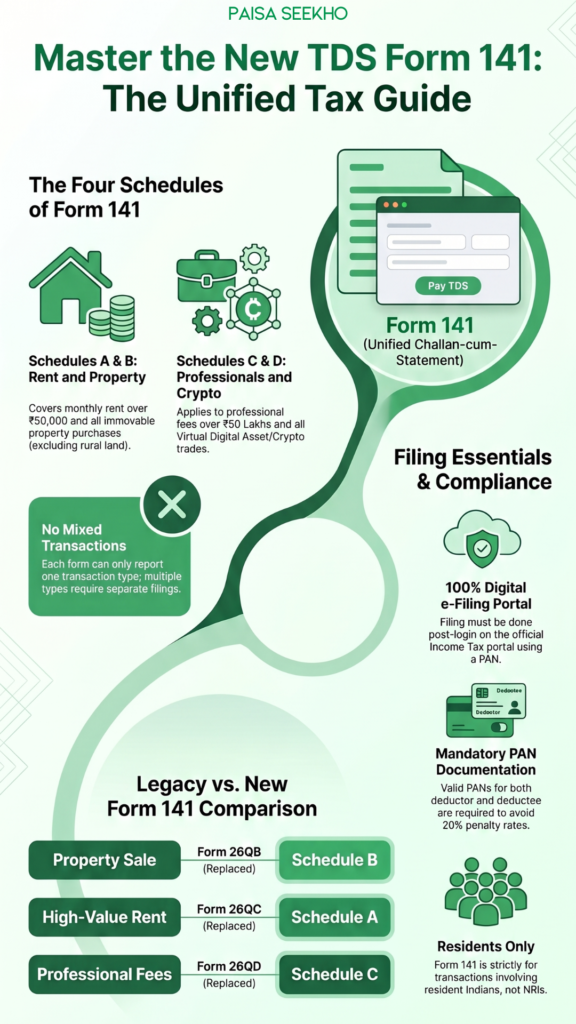
- The Big Change: Form 141 replaces the old, confusing forms (26QB, 26QC, 26QD, and 26QE) under the new Income Tax Act 2025.
- What is it? It is a single, “Unified Challan-cum-Statement.” This means you use it to both report the transaction to the government and pay the actual tax money at the same time.
- The 4 Categories: The form is divided into four easy schedules. Schedule A (Rent), Schedule B (Property Sale), Schedule C (Contractors/Professionals), and Schedule D (Crypto/Virtual Digital Assets).
- The Core Rule: You can only report one type of transaction per form. You cannot mix a rent payment and a property purchase on the exact same form.
- How to File: It is completely digital. You log into the official Income Tax e-Filing portal using your PAN and fill it out online.
Introduction
If you have ever bought a house, paid heavy rent for an apartment in Mumbai, or hired a high-end wedding planner, you might have bumped into a complicated tax rule called TDS (Tax Deducted at Source).
In the old days, filing this TDS was a massive headache. If you bought a property, you had to use a form called 26QB. If you paid rent, you used 26QC. If you paid a professional contractor, you hunted down 26QD. It was an absolute alphabet soup of confusing tax forms that frustrated regular taxpayers.
Thankfully, the government listened. With the massive rollout of the brand-new Income Tax Act, 2025, the tax department decided to take all these confusing, scattered forms, throw them in the trash, and replace them with one master document.
Enter the hero of our story: Form 141.
Officially known as the “Unified Challan-cum-Statement,” Form 141 is the only form you now need to know if you are a regular person (not a massive corporation) trying to pay your TDS accurately and legally.
Whether you are buying a dream home in 2026, paying a premium rent, or even trading virtual digital assets (like Crypto), this is your ultimate Paisaseekho guide to understanding and filing Form 141 like an absolute pro.
What Exactly is TDS and Why Do You Have to Pay It?
Before we dive into the technical details of the new form, let’s make sure we understand the concept.
TDS stands for Tax Deducted at Source. Usually, we think of companies deducting TDS from an employee’s salary. But the government also forces you (the individual citizen) to act as a tax collector in certain big-money situations.
Let’s look at a simple example:
Imagine you buy a luxury apartment from Mr. Sharma for ₹1 Crore.
If you give Mr. Sharma the full ₹1 Crore, the government is terrified that Mr. Sharma might take the money, fly to Dubai, and never pay his income tax on that massive sale.
So, the Income Tax Act steps in and says: “Hey, before you give Mr. Sharma his money, you must deduct 1% (₹1 Lakh) and deposit it directly to the government. You only give Mr. Sharma ₹99 Lakhs.”
By doing this, the government secures its tax revenue right at the “source” of the transaction. If you fail to deduct this tax, the government will penalize you, not Mr. Sharma!
This exact logic applies to paying heavy rent or hiring expensive professionals. And now, thanks to the 2025 Act, the legal mechanism you use to report this deduction to the government falls under Section 393(1), and the paperwork you use is Form 141.
Decoding Form 141: The 4 Schedules You Must Know
To keep things neat and organized, the Income Tax Department has divided Form 141 into four specific “Schedules.” Think of them as different pages in a notebook. Depending on what you are doing, you only need to fill out one specific schedule.
Let us break down exactly who needs to fill out which schedule:
Schedule A: The “Heavy Rent” Rule
- Who it applies to: Any individual or Hindu Undivided Family (HUF).
- The Condition: If you are renting a house, an office, or even machinery, and you pay a resident landlord more than ₹50,000 per month (or part of a month) as rent.
- What you must do: You must deduct the specified TDS from the rent amount before paying your landlord, and you report this deduction by filing Schedule A of Form 141.
Schedule B: The “Property Buyer” Rule
- Who it applies to: Any person buying property (the Transferee).
- The Condition: If you are buying any immovable property (like a flat, a villa, or a commercial shop, but excluding rural agricultural land) from an Indian resident.
- What you must do: When you credit the money to the seller or actually pay them, you must deduct the required TDS. You report this massive transaction by filing Schedule B of Form 141.
Schedule C: The “Expensive Professional” Rule
- Who it applies to: Any individual or HUF.
- The Condition: If you pay a resident Indian more than ₹50 Lakhs in a single financial year for services. This includes paying a contractor to build your house, paying massive brokerage fees, or paying a premium architect or lawyer for professional fees.
- What you must do: You cannot just hand over ₹50 Lakhs. You must deduct tax at the source as per Section 393(1) and officially report it using Schedule C of Form 141.
Schedule D: The “Crypto and Virtual Asset” Rule
- Who it applies to: Anyone buying a Virtual Digital Asset (VDA), like Bitcoin, Ethereum, or NFTs, from a resident Indian.
- The Condition: The government is keeping a very close eye on crypto. If the money you pay for these virtual assets crosses a specific monetary threshold (which is generally quite low for individuals with small turnovers), you must deduct tax.
- What you must do: You report this futuristic tax deduction by filing Schedule D of Form 141.
Important Rules for Filling Out Form 141
Now that you know which schedule applies to your situation, there are a few strict, non-negotiable rules you must follow when using this unified form.
- No Mixing Transactions: Form 141 is highly organized. You can only report one type of transaction per form. For example, if you bought a house (Schedule B) and you also pay heavy rent for your office (Schedule A) in the same month, you cannot combine them. You must log in and file two completely separate Form 141s.
- Multiple Sellers are Allowed (Sometimes): What if you buy a house that is jointly owned by three brothers? You can include multiple “deductees” (the brothers) on the exact same Form 141, but only if they fall under the same category and the month you deducted the tax is identical.
- Residents Only: Form 141 is strictly designed for transactions involving Resident Indians. If you are buying a property from an NRI (Non-Resident Indian), the tax rules are completely different, the TDS rates are much higher, and you cannot use this simple form.
- Mandatory PAN: Because it is a “PAN-based” challan, you absolutely must have the valid PAN card details of both yourself (the deductor) and the person you are paying (the deductee). If the seller refuses to give you their PAN, the tax law forces you to deduct TDS at a massive penalty rate of 20%!
Step-by-Step: How to File Form 141 Online
Filing this form does not require you to stand in a line at the bank or hire an expensive Chartered Accountant for a simple transaction. The entire process is completely digital and designed to be user-friendly.
Here is your simple, step-by-step guide to filing Form 141:
Step 1: Get Your Prerequisites Ready
Before you begin, ensure you have an active internet connection, your PAN card, the seller/landlord’s PAN card, and the exact details of the transaction (like the property address or the rent agreement). Also, ensure your PAN is linked to your Aadhaar card, as this is now mandatory for smooth portal operations.
Step 2: Log In to the Portal
Go to the official Income Tax e-Filing website (the same place you file your yearly ITR). Do not look for a pre-login link. Form 141 can only be accessed in “post-login mode.” Log in using your valid User ID (which is usually your PAN) and your password.
Step 3: Navigate to Payments
Once you are logged into your dashboard, look for the “e-Pay Tax” option in the top menu or the quick links section.
Step 4: Select Form 141 and the Schedule
Under the payment section, you will find the option for “New Payment.” Select the option for TDS on Property/Rent/Professionals, which will lead you to the unified Form 141. The system will ask you to choose which of the four Schedules (A, B, C, or D) you want to fill out.
Step 5: Fill in the Details
This is the most important part. You must carefully type in:
- The Deductor Details: Your PAN, address, and contact number.
- The Deductee Details: The seller or landlord’s PAN, address, and contact number.
- The Transaction Details: The total value of the property or rent, the date you made the payment, the date you deducted the tax, the applicable TDS rate, and the exact tax amount.
Step 6: Pay the Money and Download
Once you verify all the information is correct, proceed to the payment gateway. You can use net banking, debit cards, or even UPI to transfer the deducted tax money directly to the government.
As soon as the payment is successful, the system will instantly generate your Challan-cum-Statement. Download this PDF document immediately and save it safely on your computer.
(Pro Tip: After a few days, you must log into the TRACES portal to download the official TDS Certificate (like Form 16B or 16C) and give it to the seller/landlord, so they have proof that you paid their tax to the government).
Conclusion: A Massive Win for the Middle Class
Nobody actually enjoys paying taxes or filling out government forms. But as responsible citizens, it is something we have to do.
The introduction of Form 141 under the Income Tax Act 2025 is a massive win for the everyday taxpayer. By consolidating confusing forms like 26QB and 26QC into a single, unified, four-schedule document, the government has drastically reduced the administrative headache of large financial transactions.
The next time you make a massive payment—whether you are buying your dream home, paying premium rent, or investing in virtual digital assets—do not let the fear of TDS intimidate you. Just remember this guide, grab the PAN details, log into the portal, and conquer Form 141 like a true financial pro!
Frequently Asked Questions (FAQs) About Form 141
Q1: What exactly is Form 141?
Form 141 is a new “Unified Challan-cum-Statement” introduced under the Income Tax Act 2025. It is used by individuals and HUFs to legally report and deposit Tax Deducted at Source (TDS) for specific transactions like buying property, paying heavy rent, or paying professionals.
Q2: Which old forms did Form 141 replace?
Form 141 completely replaces the old, scattered forms from the 1961 Act. Specifically, it replaces Form 26QB (for property), Form 26QC (for rent), Form 26QD (for professionals), and Form 26QE (for virtual digital assets).
Q3: Do I need to deduct TDS if my monthly rent is ₹40,000?
No. Under Schedule A of Form 141, an individual or HUF is only required to deduct TDS on rent if the monthly payment exceeds ₹50,000. Since your rent is below this threshold, you do not need to worry about TDS or Form 141.
Q4: I am buying an agricultural farm. Do I need to file Schedule B?
No. Schedule B (TDS on transfer of immovable property) explicitly excludes rural agricultural land. You only need to file it when buying residential houses, commercial spaces, or urban plots.
Q5: What happens if the person I am buying a house from does not have a PAN card?
If the seller refuses to provide a valid PAN card, the Income Tax Act requires you to deduct TDS at a punitive higher rate—usually a flat 20% of the transaction value. You will still need to use Form 141 to deposit this massive deduction.
Q6: Can I use Form 141 if I am buying a property from an NRI?
No. Form 141 is strictly applicable only when the deductee (the seller, landlord, or professional) is a Resident Indian. Transactions involving Non-Resident Indians (NRIs) fall under different sections with much stricter rules and higher TDS rates.
Q7: Can I fill out Form 141 before logging into the income tax portal?
No. Form 141 is a highly secure document that can only be filled out in “post-login mode.” You must first log into the official Income Tax e-Filing portal using your PAN and password before you can access the form.
Q8: What is Schedule D in Form 141 used for?
Schedule D is the newest addition, specifically designed for the digital age. It is used to report TDS when you buy “Virtual Digital Assets” (VDAs)—which primarily includes cryptocurrencies like Bitcoin or digital NFTs—from a resident Indian, provided the transaction crosses the specified monetary limits.
Q9: Do I have to give a certificate to the seller after filing Form 141?
Yes. Form 141 is just you telling the government you paid the money. After a few days, you must log into the separate TRACES portal, download the official TDS Certificate (like Form 16B for property or 16C for rent), and hand that certificate to the seller so they can claim the tax credit in their own ITR.
Q10: Is it mandatory to link PAN and Aadhaar to file this form?
While the portal technically uses your PAN, the government strongly recommends (and often enforces) that your PAN must be linked to your Aadhaar and your PAN status must show as “Active.” If your PAN is inoperative due to non-linking, you may face severe technical hurdles or penalties while trying to file Form 141.
Last Updated on 3 weeks ago by Team Paisaseekho