
Quick summary: Challan 280, also called ITNS 280, is the payment form used to pay income tax directly to the government, separate from tax that gets deducted automatically as TDS. If you owe advance tax, self-assessment tax, or tax on a demand notice, this is the form connected to that payment. This guide explains what it covers, how to pay it step by step, and the mistakes that trip up most people.
What Is Challan 280, in Simple Words?
Think of Challan 280 as a receipt-generating form for any income tax you pay on your own, rather than tax that someone else, like your employer or bank, deducted on your behalf.
It covers four main types of payment:
- Advance tax, paid in instalments during the year, if your total tax due is expected to cross ₹10,000 after considering TDS already deducted
- Self-assessment tax, the extra tax you pay just before filing your return, to cover any shortfall between what was already paid and what you actually owe
- Tax on regular assessment, if the tax department reviews your return and asks you to pay an additional amount
- Tax on distributed profits or income, a less common category, mainly relevant to companies
Officially, this form is called ITNS 280. Most people simply call it Challan 280.
Is Challan 280 Still a Separate Form Today?
Not exactly, and this is worth clarifying, since a lot of older information online still talks about it as a standalone form. The income tax payment process moved from an older system, called OLTAS, to a newer, unified system called e-Pay Tax, available directly on the Income Tax e-filing website.
In simple words: you no longer fill out a separate “Challan 280 form.” Instead, you go to the e-Pay Tax section of the income tax portal, and the system internally uses the same ITNS 280 structure to record your payment. People still call this process “paying Challan 280,” even though you are technically using the e-Pay Tax facility.
A new version is also coming. As part of the Income Tax Act, 2025, a new variant called ITNS 280N applies to payments made from Tax Year 2026-27 onwards. For payments related to FY 2025-26, which is what most people are paying right now, the regular ITNS 280 process still applies.
When Do You Actually Need to Pay Using Challan 280?
You need to pay advance tax if:
- Your total tax liability for the year, after subtracting any TDS already deducted, is expected to be ₹10,000 or more
- This applies to freelancers, consultants, business owners, and salaried employees who also have income from capital gains, rent, or interest that pushes their total tax above this limit
You need to pay self-assessment tax if:
- When you sit down to file your ITR, your total tax due is more than what has already been paid through TDS and advance tax
- The Income Tax Act requires you to clear this amount before you can even submit your return
You need to pay tax on regular assessment if:
- The tax department reviews your filed return and sends you a notice asking for additional tax
- You agree with the department’s assessment and are ready to pay
One useful exemption to know: resident senior citizens, aged 60 or above, who do not have income from a business or profession are not required to pay advance tax, even if their tax liability crosses ₹10,000.
How Do You Actually Pay Using e-Pay Tax (Challan 280)?
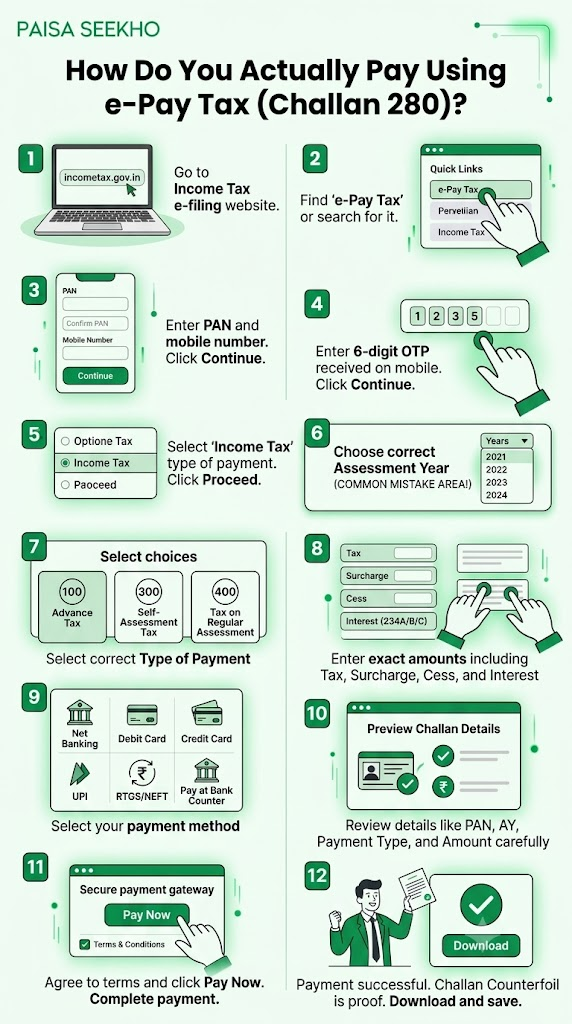
- Step 1: Go to the Income Tax e-filing website at incometax.gov.in
- Step 2: Look for “e-Pay Tax” under the Quick Links section on the homepage, or search for it in the search bar.
- Step 3: Enter your PAN, confirm it, and enter your mobile number. Click Continue.
- Step 4: Enter the 6-digit OTP sent to your mobile number, and click Continue.
- Step 5: Select “Income Tax” as the type of payment, and click Proceed.
- Step 6: Choose the correct Assessment Year. This is one of the most common places people make mistakes, explained in detail below.
- Step 7: Choose the correct “Type of Payment”:
- (100) Advance Tax
- (300) Self-Assessment Tax
- (400) Tax on Regular Assessment
- Step 8: Enter the exact amount you need to pay, broken down into Tax, Surcharge, and Cess if applicable. You can also add interest amounts if you owe any under Sections 234A, 234B, or 234C.
- Step 9: Select your payment method: net banking, debit card, credit card, UPI, RTGS/NEFT, or pay at a bank counter.
- Step 10: Review the challan details on the preview screen carefully. Check your PAN, Assessment Year, payment type, and amount one more time before proceeding.
- Step 11: Click Pay Now, agree to the terms and conditions, and complete the payment through your chosen method.
- Step 12: Once successful, you will see a Challan Counterfoil, your official proof of payment. Download and save this.
Why Is Choosing the Right Assessment Year So Important?
This is, by a wide margin, the most common mistake people make with Challan 280, so it deserves its own clear explanation.
The Assessment Year (AY) is always one year ahead of the Financial Year (FY) the income relates to.
- If you are paying advance tax for the current year’s income, FY 2026-27, you must select AY 2027-28.
- If you are paying self-assessment tax for last year’s income, FY 2025-26, the year you are filing your return for right now, you must select AY 2026-27.
Why this trips people up: advance tax and self-assessment tax often get paid within a few months of each other, but they belong to two different assessment years. Selecting the wrong one means your payment gets linked to the wrong year’s tax record, which can result in a mismatch or even a notice, even though you genuinely paid the money.
What Should You Save After Making the Payment?
After a successful payment, note down or save these three details from your challan counterfoil, since you will need them later:
- BSR Code, a seven-digit code identifying the bank branch
- Challan Serial Number
- Date of Payment
Together, these three details form what is called the CIN (Challan Identification Number). You will need to enter this CIN, or these three individual details, in your ITR when you claim credit for this payment. If you were logged in while making the payment, these details usually auto-populate in your ITR within 2 to 3 working days.
How Long Does It Take to Show Up in Form 26AS?
Tax paid through e-Pay Tax typically reflects in your Form 26AS within 3 to 5 working days. If you do not see it after this window, do not panic immediately, but do keep your stamped bank receipt or challan counterfoil safe, since you may need it to raise a query if the entry still does not appear after a reasonable wait.
The Advance Tax Payment Schedule
If you are required to pay advance tax, it is not paid as a single lump sum. It follows a fixed instalment schedule through the year:
| Due Date | Percentage of Total Estimated Tax |
| 15 June | 15% |
| 15 September | 45% (cumulative) |
| 15 December | 75% (cumulative) |
| 15 March | 100% (cumulative) |
If you have opted for the presumptive taxation scheme, common for small businesses and certain professionals, you can pay your entire advance tax liability in one single instalment, by 15 March, instead of following the quarterly schedule above.
Any shortfall remaining after 31 March is then paid as self-assessment tax, along with interest, when you file your return.
What Happens If You Do Not Pay Advance Tax on Time?
There is no fixed penalty, but interest applies. If at least 90% of your total tax liability is not paid by 31 March, through advance tax or TDS combined, interest at 1% per month is charged on the shortfall. This interest continues to accumulate until the balance is cleared, usually through self-assessment tax at the time of filing.
What If You Make a Mistake in the Challan?
Errors do happen, wrong Assessment Year, wrong PAN, wrong payment type, and there is a process to fix them.
- Step 1: Log in to the Income Tax e-filing portal.
- Step 2: Go to Services, then Challan Correction.
- Step 3: Click “+ Create Challan Correction Request.”
- Step 4: Select the type of correction needed.
- Step 5: Enter the corrected details, review them, and confirm.
- Step 6: E-verify the request using an available method, like Aadhaar OTP.
An important limit to know: correction through this online process is generally allowed only once. If you need to make further changes after that, you will need to approach your Jurisdictional Assessing Officer directly for assistance.
What If You Paid Too Little or Too Much?
If you paid less than required: simply make a supplementary payment for the remaining difference, using the same challan type and the same Assessment Year, to cover the shortfall.
If you paid more than required: you do not need to do anything extra. The excess amount is automatically adjusted during your ITR processing, and any remaining balance is refunded to you by the Income Tax Department.
Frequently Asked Questions
1. Is Challan 280 the same as a TDS challan?
No. Challan 280 (ITNS 280) is for income tax you pay directly, like advance tax or self-assessment tax. TDS payments use a different challan, called ITNS 281. If you are a business depositing tax deducted from an employee’s salary or a vendor’s payment, you use Challan 281, not Challan 280.
2. Can I still pay Challan 280 offline, at a bank branch?
Yes, offline payment through a designated bank branch, using a physical challan form, cash, or a cheque, is still available for those who prefer it, though most people today use the online e-Pay Tax process, since it is faster and generates instant proof of payment.
3. What is the difference between advance tax and self-assessment tax?
Advance tax is paid in instalments during the financial year itself, based on your estimated income for that year. Self-assessment tax is the extra amount you pay closer to, or while, filing your return, to cover any gap between your actual final tax liability and what you already paid through TDS and advance tax.
4. I am salaried and my employer deducts TDS. Do I still need to pay advance tax?
Usually not, if your only income is salary and TDS covers your full liability. However, if you also have significant income from capital gains, rental income, or freelance work, and your total tax due, after TDS, crosses ₹10,000, you are required to pay advance tax on that additional amount.
5. How do I know if my Challan 280 payment was successful?
Once payment is complete, the portal displays a Challan Counterfoil with your CIN details. You can also log in later, go to e-File, then e-Pay Tax, then Payment History, to view or download your receipt. The status will show as “PAID” once fully processed.
6. What happens if I selected the wrong Assessment Year by mistake?
You can raise a Challan Correction request through the Income Tax portal, under Services then Challan Correction. If the online correction option does not cover your specific situation, or if you have already used your one-time online correction, you will need to approach your Jurisdictional Assessing Officer for further help.
Key Takeaways
- Challan 280 (ITNS 280) is the payment form used for income tax you pay directly: advance tax, self-assessment tax, and tax on regular assessment.
- It is no longer a separate, standalone form. Payments are now made through the e-Pay Tax facility on the Income Tax e-filing website, which internally uses the same ITNS 280 structure.
- Selecting the correct Assessment Year is the most common mistake. Remember: the Assessment Year is always one year ahead of the Financial Year the tax relates to.
- Save your CIN, BSR Code, Challan Serial Number, and Date of Payment, after every payment, since you need these details to claim credit in your ITR.
- Advance tax is due in instalments: 15% by 15 June, 45% by 15 September, 75% by 15 December, and 100% by 15 March.
- Correction of a challan error is possible through the portal, but generally allowed only once online; further changes need your Jurisdictional Assessing Officer’s help.
- Payment usually reflects in your Form 26AS within 3 to 5 working days.
Sources: Income Tax Department, Government of India: e-Pay Tax Facility; Tax Garden: Pay Income Tax Online, e-Pay Tax Guide 2026; ClearTax: Income Tax Challan, How to Pay Your Income Tax Online?; CAclubindia: Self Assessment Tax 2026, How to Calculate and Pay Online, June 2026.
This article is for general information only and does not give tax advice. For guidance specific to your situation, consult a Chartered Accountant.
Last Updated on 1 month ago by Team Paisaseekho