
Quick summary: TRACES stands for TDS Reconciliation Analysis and Correction Enabling System. It is a website run by the Income Tax Department that keeps track of all the tax deducted or collected on your behalf during the year. If you have ever downloaded a Form 16, checked your Form 26AS, or heard your employer or bank mention “we filed it on TRACES,” this is the website they are talking about. This guide explains what TRACES actually does, who uses it, and how it fits into your tax life.
What Does TRACES Actually Do?
Think of TRACES as the record-keeping system behind every tax deduction in India. Every time your employer deducts tax from your salary, your bank deducts tax from your FD interest, or a tenant deducts tax from rent paid to you, that deduction eventually gets recorded and processed through TRACES.
TRACES does three main jobs:
- It stores TDS and TCS records. Every quarterly TDS return filed by an employer, bank, or business gets processed here.
- It generates official certificates. Documents like Form 16, Form 16A, and Form 16B are created and downloaded from TRACES.
- It lets you check your tax credit. You can view Form 26AS, your official record of tax already paid on your behalf, directly through TRACES.
TRACES is run by the Centralised Processing Cell (TDS), a wing of the Income Tax Department, and its website address is tdscpc.gov.in.
Who Actually Uses TRACES?
TRACES has two very different types of users, and it is worth understanding both, since they see different things on the same website.
1. Deductors (Employers, Banks, and Businesses)
If a business deducts TDS from any payment, salary, rent, professional fees, interest, they must register on TRACES using their TAN, Tax Deduction Account Number. Through this login, they:
- File quarterly TDS returns, like Form 24Q for salary, or Form 26Q for other payments
- Download Form 16, Form 16A, and other certificates to give to employees or vendors
- Fix mistakes in their filings through correction statements
- Check the status of their filed returns
2. Taxpayers (You)
As an individual, you can also register on TRACES using your PAN. Through this login, you can:
- View and download your Form 26AS
- Check whether TDS deducted by your employer or bank has actually been deposited and recorded
- Verify a Form 16 or Form 16A you received, to confirm it is genuine
- Track the status of any TDS-related grievance or query
Important: you do not need a TRACES login just to check your Form 26AS anymore. You can also see it directly through the Income Tax e-filing website, without a separate TRACES account. A separate TRACES login is more useful for deductors, or for taxpayers who want a more detailed view.
How Is TRACES Different From the Income Tax e-Filing Website?
This is one of the most common points of confusion, so let us clear it up simply.
| TRACES | Income Tax e-Filing Website | |
| What it is for | Managing TDS and TCS records | Filing your income tax return (ITR) |
| Main users | Employers, banks, and businesses who deduct tax | All individual taxpayers |
| What you do there | File TDS returns, download Form 16/16A, check Form 26AS | File your ITR, view AIS and TIS, check refund status |
| Website address | tdscpc.gov.in | incometax.gov.in |
| Login | TAN-based (for deductors) or PAN-based (for taxpayers) | PAN-based |
In simple words: TRACES is where tax gets tracked and certificates get created. The e-filing website is where you actually submit your tax return using that information.
You will often be redirected from the e-filing website to TRACES when you click on certain links, like “View Form 26AS,” since that specific feature lives on the TRACES system even though you accessed it through the main portal.
What Documents Come From TRACES?
Several important tax documents are generated only through TRACES, and nowhere else:
- Form 16. The annual TDS certificate your employer gives you, showing your salary and the tax deducted from it.
- Form 16A. The TDS certificate for non-salary payments, like interest deducted by your bank, or fees deducted by a client.
- Form 16B. The TDS certificate a property buyer gives to a seller after deducting tax on a property purchase.
- Form 16C. The TDS certificate a tenant gives to a landlord after deducting tax on rent.
- Form 26AS. Your consolidated tax credit statement, showing all TDS, TCS, and tax payments recorded against your PAN.
An important rule to know: only a Form 16 (or similar certificate) downloaded from TRACES is considered a valid, official document. If someone hands you a manually typed Form 16, without a TRACES watermark or certificate number, it does not carry the same legal weight and may not be accepted by the tax department.
Do You Need to Register on TRACES as an Individual?
Not always. Here is a simple way to decide.
You probably do not need a separate TRACES login if:
- You are a salaried employee who simply wants to check your Form 26AS. You can view this directly through the Income Tax e-filing website without a separate TRACES account.
- You just need to receive Form 16 or Form 16A from your employer or bank. They handle the TRACES side; you simply receive the finished document from them.
You may want to register on TRACES if:
- You want to raise a specific TDS-related complaint or query directly
- You are verifying whether a Form 16 or Form 16A you received is genuine
- You want a more detailed history of your tax credits over multiple years
How Do You Log In to TRACES?
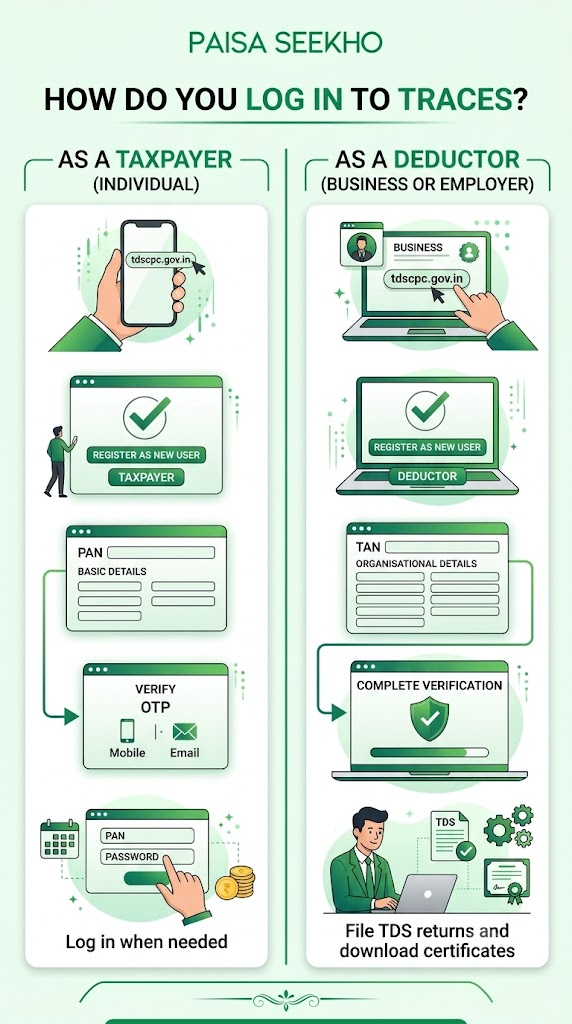
As a taxpayer (individual):
- Go to tdscpc.gov.in
- Click on “Register as New User,” then select “Taxpayer”
- Enter your PAN and other basic details
- Verify using an OTP sent to your registered mobile number or email
- Once registered, log in with your PAN and password whenever needed
As a deductor (business or employer):
- Go to tdscpc.gov.in
- Click on “Register as New User,” then select “Deductor”
- Enter your TAN and other organisational details
- Complete the verification process
- Once registered, use this login to file TDS returns and download certificates
Why Does TRACES Matter to You, Even If You Never Log In?
Even if you never personally visit the TRACES website, it directly affects you in three important ways:
Your TDS credit depends on it.
The tax deducted from your salary, FD interest, or any other payment only counts toward your tax credit once your employer or bank has correctly reported it through TRACES.
Your Form 16 comes from it.
The certificate you receive every June, showing your salary and tax details, is generated on TRACES by your employer.
Errors get fixed through it.
If there is ever a mismatch between what your employer told you and what shows in your Form 26AS, the fix has to happen through a correction filed on TRACES by your employer or bank, not by you directly.
Frequently Asked Questions
1. Is TRACES the same as the Income Tax e-filing website?
No. TRACES (tdscpc.gov.in) manages TDS and TCS records and certificate generation. The Income Tax e-filing website (incometax.gov.in) is where you file your actual income tax return. They are connected but are separate systems.
2. Do I need to create a TRACES account to file my ITR?
No. Filing your ITR happens entirely on the Income Tax e-filing website. You do not need a separate TRACES login for this.
3. Can I download my own Form 16 from TRACES?
No. Form 16 is downloaded and generated by your employer, using their TAN-based login on TRACES. As an individual employee, you receive the finished Form 16 from your employer; you do not download it yourself directly from TRACES.
4. What does TDS stand for, and how does it relate to TRACES?
TDS stands for Tax Deducted at Source, tax that is deducted from a payment before it reaches you. TRACES is the system that records, tracks, and manages all of these TDS deductions across the country.
5. Is TRACES only for businesses?
No. While employers, banks, and other businesses use TRACES to file TDS returns and generate certificates, individual taxpayers can also register on TRACES to check their tax credit history or verify a certificate they received.
6. What should I do if my Form 16 does not look like it came from TRACES?
Ask your employer to confirm and reissue it. A genuine Form 16 downloaded from TRACES carries a specific certificate number and a TRACES watermark. A document without these may not be valid for filing purposes or during any tax scrutiny.
Key Takeaways
- TRACES stands for TDS Reconciliation Analysis and Correction Enabling System, and it is the government system that manages all TDS and TCS records in India.
- It is run by the Income Tax Department, and its website is tdscpc.gov.in.
- Employers and businesses use TRACES (with their TAN) to file TDS returns and generate certificates like Form 16 and Form 16A.
- Individual taxpayers can use TRACES (with their PAN) to view their tax credit history, though checking Form 26AS can also be done directly through the main Income Tax e-filing website.
- TRACES is different from the Income Tax e-filing website. TRACES manages TDS records and certificates; the e-filing website is where you submit your actual income tax return.
- Only certificates downloaded from TRACES are officially valid. A manually prepared Form 16 or similar document does not carry the same legal standing.
Sources: Income Tax Department, Government of India: TRACES; Income Tax Department: Form 16 and Form 16A; TRACES: FAQs, Form 16 General.
This article is for general information only and does not give tax advice. For guidance specific to your situation, consult a Chartered Accountant.
Last Updated on 1 month ago by Team Paisaseekho