

Quick summary: Every June, salaried employees across India receive a document called Form 16 from their employer. This is your official TDS (Tax Deducted at Source) certificate, proof that your employer deducted tax from your salary and deposited it with the government. Form 16 has two parts: Part A is generated by the government’s TRACES portal and shows a quarter-wise summary of TDS deposited. Part B is prepared by your employer and contains a detailed breakdown of your salary, exemptions, deductions, and the total tax calculated. Together, the two parts give you almost everything you need to file your Income Tax Return (ITR).
What Is Form 16?
Form 16 is a TDS certificate issued by an employer to a salaried employee under Section 203 of the Income Tax Act, 1961, read with Rule 31(1)(a) of the Income Tax Rules, 1962. It certifies that the employer has deducted tax from the employee’s salary and deposited it with the Central Government.
Think of Form 16 as your annual tax report card from your employer. It tells you:
- How much salary you were paid
- How much tax was deducted from your salary every month
- That the deducted tax was actually deposited with the government
- How your final taxable income was calculated, after deductions
Form 16 is mandatory for ITR filing, and it’s also widely accepted as income proof by banks when you apply for a home loan, personal loan, or credit card, or when you need to show proof of income for visa applications.
Who Issues Form 16?
Your employer issues Form 16, not the Income Tax Department and not you. Every employer who deducts even a single rupee of TDS from an employee’s salary during the financial year is required to issue Form 16. This applies to all types of employers: private companies, government departments, public sector undertakings, NGOs, schools, hospitals, and any other establishment.
The due date for issuing Form 16 is on or before 15 June of the assessment year, which means for FY 2025-26 (April 2025 to March 2026), your employer must give you Form 16 by 15 June 2026. If an employer fails to issue it on time, a penalty of ₹100 per day per certificate applies under Section 272A(2)(g) of the Income Tax Act, capped at the amount of tax deductible.
If your income was below the taxable limit and no TDS was deducted, your employer is technically not required to issue Form 16, though many employers do so anyway as a salary record.
Form 16 Part A: The Government-Verified Half
What Is Form 16 Part A?
Part A of Form 16 is the portion generated by the Income Tax Department’s TRACES portal (Tax Deduction and Collection Account Number Reconciliation Analysis and Correction Enabling System, accessible at tdscpc.gov.in). Your employer logs into TRACES using their TAN (Tax Deduction Account Number) and downloads Part A from there.
Because Part A is sourced directly from the TRACES portal, it carries the weight of a government-verified document. A genuine Part A always has:
- A TRACES watermark on the document
- A unique seven-character certificate number
- A digital signature from the authorised signatory
If your employer hands you a Form 16 Part A that was typed manually in Word or Excel, without a TRACES watermark and certificate number, that document is not valid for official purposes. During ITR processing and tax scrutiny, the Income Tax Department’s system validates your TDS credit against the TRACES-generated data. A self-prepared Part A simply won’t match those records.
What Information Is in Form 16 Part A?
According to the official Form 16 format prescribed by the Income Tax Department, Part A contains:
- Employer’s details: Name, address, PAN (Permanent Account Number), and TAN
- Employee’s details: Name, address, and PAN
- Period of employment: The “from” and “to” dates for which you were employed with that employer during the financial year
- Assessment year: The relevant assessment year (e.g., AY 2026-27 for FY 2025-26)
- Quarter-wise TDS summary: A table showing, for each quarter of the financial year, the receipt number of the TDS return filed, the amount of salary paid or credited, and the amount of tax deducted. Remember, your TDS credits in Part A must match what appears in Form 26AS.
This quarterly summary is pulled directly from the employer’s Form 24Q filings, the quarterly TDS return that all employers must file. This is why Part A cannot be generated until the employer files all four quarters of Form 24Q, and in particular the fourth quarter (for January–March) which must be filed by 31 May.
Why Form 16 Part A Matters
Part A is your proof that TDS was not just deducted from your salary but actually deposited with the government. The figures in Part A are what appear in your Form 26AS (the consolidated tax statement) and Annual Information Statement (AIS). Before filing your ITR, you should cross-check Part A of your Form 16 against Form 26AS to make sure the numbers match.
If your TDS is showing in Part A but not in Form 26AS, it could mean your employer filed an incorrect PAN, or there was a challan mismatch. These need to be corrected before you file your ITR.
Form 16 Part B: The Salary Breakdown
What Is Form 16 Part B?
Part B of Form 16 is prepared by the employer (not downloaded from TRACES) and contains the full, detailed computation of your taxable salary and the tax on it. It is essentially the income tax calculation your employer’s payroll team did on your behalf during the year, the same calculation they used to decide how much TDS to deduct each month.
Unlike Part A, Part B is not system-generated from a government portal. But it still must be digitally signed or manually signed by the authorised signatory at the employer.
What Information Is in Form 16 Part B?
Part B is a detailed statement that typically includes the following, in order:
Gross Salary:
- Basic salary
- HRA (House Rent Allowance)
- LTA (Leave Travel Allowance)
- Special allowance or other allowances
- Perquisites (benefits like a company car, accommodation, or subsidised loans)
- Bonus, incentives, or any other salary components
Exemptions Deducted Under Section 10:
- HRA exemption under Section 10(13A), the portion of your HRA that is tax-free based on the rent you pay
- LTA exemption under Section 10(5), for travel expenses within India
- Any other exemptions under Section 10
Standard Deduction:
- The flat deduction every salaried employee gets without needing to submit any proof (₹75,000 under the new tax regime or ₹50,000 under the old tax regime for FY 2025-26)
Income from House Property:
- Any deduction for interest paid on a home loan for a self-occupied property, claimed under Section 24(b)
Income from Other Sources (declared to employer):
- Other income you disclosed to your employer for TDS computation purposes
Gross Total Income:
- After adding all income and subtracting the above exemptions and standard deduction
Chapter VI-A Deductions (available under the old tax regime):
- Section 80C, investments in PPF, life insurance premiums, ELSS, EPF contributions, tuition fees, home loan principal repayment, etc. (combined limit of ₹1,50,000)
- Section 80D, health insurance premiums
- Section 80CCD(1B), additional NPS contributions
- Section 80G, donations to eligible organisations
- Any other eligible deductions
Taxable Income:
- Gross Total Income minus Chapter VI-A deductions = the final income on which tax is computed
Tax Computation:
- Tax calculated on taxable income using the applicable slab rates (old or new regime, as per the regime chosen)
- Rebate under Section 87A (if taxable income qualifies)
- Health and Education Cess (4%)
- Total tax payable for the year
TDS Already Deducted:
- Amount of TDS deducted during the year (and any TDS by a previous employer, if disclosed to the current employer)
Net Tax Payable or Refundable:
- If TDS deducted > tax payable: you’re due a refund (claim it while filing your ITR)
- If TDS deducted < tax payable: you need to pay the balance as self-assessment tax before filing
Form 16 Part A vs Part B: A Quick Comparison
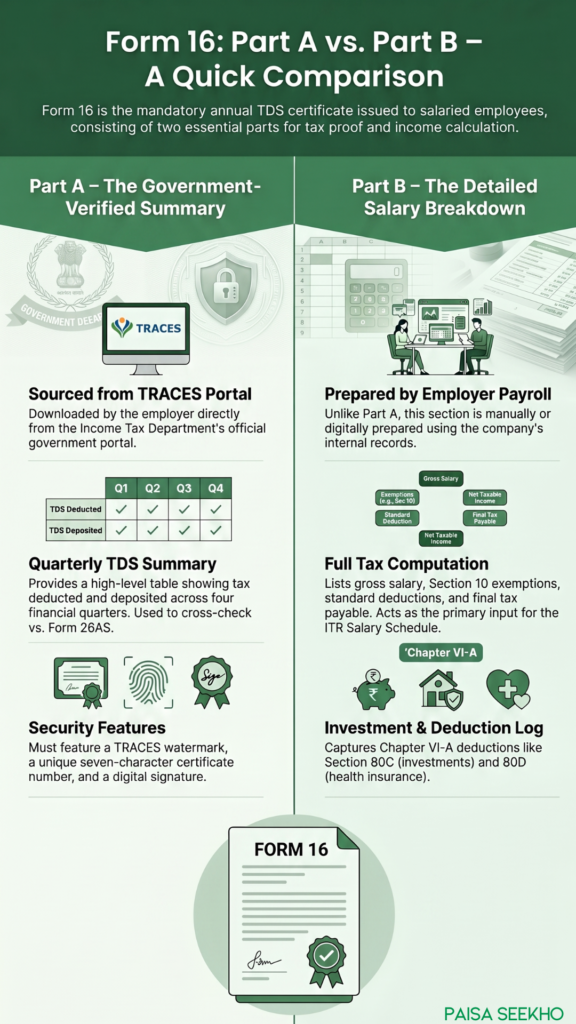
| Form 16 Part A | Form 16 Part B | |
| Who generates it | Income Tax Department’s TRACES portal | Employer’s payroll team |
| How to verify | Carries TRACES watermark, certificate number, and digital signature | Signed manually or digitally by the authorised person at the employer |
| What it shows | Quarter-wise TDS deposited by the employer; employer and employee PAN/TAN | Detailed salary breakdown, exemptions, deductions, tax computation |
| What it’s based on | Employer’s Form 24Q (quarterly TDS return) filings | Employer’s payroll records, employee’s Form 12BB declarations |
| Can an employee download it? | No, only the employer can download from TRACES | No, only the employer prepares and issues it |
| Used to cross-check against | Form 26AS / AIS | Salary slips, Form 12BB submissions |
How to Read Your Form 16 When Filing Your ITR
When ITR filing season opens, Form 16 is the main document you’ll need. Here’s how to use it:
- Verify Part A first: Check that your PAN is correct in Part A. A wrong PAN means the TDS credit won’t show up against your records. Also cross-check the Part A figures against your Form 26AS.
- Read Part B for your income details: The gross salary, exemptions, deductions, and taxable income from Part B go into your ITR’s Salary Schedule. The IT portal pre-fills some of this data from the employer’s filings, but always verify it against your Form 16.
- Add income not in Form 16: Form 16 only covers your salary and tax deducted by your employer. Income from bank interest, capital gains, rent, or freelance work must be added separately using your bank statements, Form 26AS, and AIS.
- Check which tax regime is reflected: Part B should reflect the tax regime (old or new) under which your employer computed your TDS during the year. Make sure this matches the regime you intend to file under. If you want to switch regimes for your own ITR, note that there may be additional steps involved.
- If you changed jobs during the year: You’ll receive two separate Form 16s, one from each employer. You need to combine both when filing your ITR. The current employer may have already accounted for your previous employer’s salary (if you disclosed it via Form 12B), but check Part B carefully.
- Once you’ve decoded your Form 16, the next step is picking the right ITR form for AY 2026-27.
Common Errors in Form 16 (and What to Do)
- Wrong PAN: If the PAN on Form 16 doesn’t match yours, the TDS credit will not be linked to your account. Immediately ask your employer to file a correction in their TDS return (Form 24Q) and issue a revised Form 16.
- Part A and Part B figures don’t match: This can happen if the employer’s payroll data doesn’t reconcile with what was filed in Form 24Q. Ask your employer to investigate and issue a corrected Form 16.
- Employer issued only Part B: Some employers, especially smaller ones, only provide the salary breakup (Part B) and call it Form 16. Without a TRACES-generated Part A, the document is incomplete. Insist on the full Form 16 with both parts.
- Missing Form 16 after leaving a job: You’re entitled to Form 16 from every employer you worked with during the financial year, even if you left mid-year. Contact the HR department of your previous employer. If that fails, you can still file your ITR using your salary slips and Form 26AS.
Can You File Your ITR Without Form 16?
Yes, technically. You can file using your salary slips, bank statements, Form 26AS, and AIS. But Form 16 makes the process significantly simpler and reduces the chance of errors, because it has all the calculations organised in one place. Whenever possible, use Form 16 to cross-verify your figures before filing.
Important: Form 16 Will Become Form 130
This is a change worth knowing about now, even though it doesn’t affect your current filing. Under India’s Income Tax Act, 2025, which replaces the old Income Tax Act, 1961 and takes effect from 1 April 2026, Form 16 has been renamed Form No. 130. The corresponding legal basis shifts from Section 203 of the old Act to the equivalent provision in the new Act.
However, for FY 2025-26 (income earned up to 31 March 2026), the old Income Tax Act, 1961 continues to apply. Your employer will issue Form 16 as usual by 15 June 2026. Form 130 only becomes relevant from Tax Year 2026-27, for salary income earned from April 2026 onwards, which would be issued to employees in 2027.
Frequently Asked Questions (FAQs)
1. Is Form 16 the same as a salary slip?
No. A salary slip is an accounting document issued every month showing your pay components. Form 16 is an annual tax certificate issued once a year showing the income tax deducted from your salary and the full tax computation. They serve different purposes.
2. Is Form 16 the same as an ITR?
No. Form 16 is a TDS certificate issued by your employer. An ITR is the return you file yourself with the Income Tax Department, declaring all your income and taxes. Form 16 is an input document you use while filing your ITR.
3. What if I only received Part B but not Part A?
Part B alone is not a complete Form 16. Insist on getting the full Form 16, which includes a TRACES-generated Part A with a certificate number and watermark. Without Part A, you cannot properly verify your TDS credit.
4. Can I download Form 16 myself from the TRACES portal?
No. Only your employer (the deductor) can download Form 16 from TRACES. As an employee, you receive it from your employer. However, you can log into TRACES as a taxpayer to verify that your TDS credit is correctly reflected in your account.
5. What if there’s a mismatch between Form 16 and Form 26AS?
Report it to your employer immediately. The employer needs to file a correction in their Form 24Q return to resolve the mismatch. Do not file your ITR until the mismatch is resolved, as it could lead to processing issues or a tax notice later.
6. Do I need to physically attach Form 16 to my ITR?
No. When filing your ITR online on the Income Tax Department’s e-filing portal, you do not upload or attach Form 16. You use the information in Form 16 to fill in the relevant fields in your ITR form. Keep Form 16 safely for your own records and for future reference.
7. For how long should I keep my Form 16?
The Income Tax Department can re-open an assessment up to six years after the end of the relevant assessment year in most cases. To be safe, retain your Form 16 for at least six to seven years.
Key Takeaways
- Form 16 is your annual salary TDS certificate, issued under Section 203 of the Income Tax Act by your employer, due by 15 June every year.
- Part A is generated from the government’s TRACES portal, carrying a certificate number and watermark, and shows the quarter-wise TDS deposited by your employer.
- Part B is prepared by your employer and contains the full breakdown of your salary, exemptions, deductions, taxable income, and tax computation.
- Always cross-check Part A against your Form 26AS to make sure your TDS credit is correctly recorded.
- Form 16 covers only your salary income. Interest, rent, capital gains, and other income must be reported separately in your ITR.
- From Tax Year 2026-27 onwards, Form 16 will be renamed Form No. 130 under the new Income Tax Act, 2025, but for FY 2025-26, your employer continues to issue Form 16 as usual.
Sources: Income Tax Department, Government of India – Form 16 and Form 16A; TRACES – Form 16 FAQ; Income Tax Department – TRACES E-Tutorial: Download Form 16 (Part A & Part B); Income Tax Department – Salaried Individuals for AY 2026-27.
This article is for general information and does not constitute tax advice. For your specific situation, consult a chartered accountant or tax professional.