

Quick summary: Every employer in India who deducts tax at source from an employee’s salary, even if there is only one employee on the payroll, is required to file a quarterly return called Form 24Q. This form reports exactly how much salary was paid, how much TDS was deducted under Section 192, and confirms that the deducted tax was deposited with the government. Form 24Q is the document that ultimately produces the Form 16 every salaried employee relies on to file their own Income Tax Return. This guide explains what Form 24Q contains, its two (sometimes three) annexures, the filing process, current due dates, and what changes from April 2026.
What Is Form 24Q and Who Must File It?
Form 24Q is a quarterly TDS return filed under Section 192 of the Income Tax Act, 1961, read with Rule 31A of the Income Tax Rules, 1962. It is filed by any employer, whether a company, partnership firm, proprietorship, trust, or government office, that deducts tax at source from salary payments made to employees.
There is no minimum threshold of employees for this requirement. Even an employer with a single employee whose salary crosses the taxable threshold and requires TDS deduction must file Form 24Q every quarter.
The employer is expected to estimate the employee’s annual taxable income at the start of the year, deduct TDS proportionately across the year based on that estimate (adjusted as investment declarations and proofs come in), and deposit the deducted amount with the government within the prescribed timelines. Form 24Q is how the employer then formally reports all of this activity to the Income Tax Department each quarter.
What Does Form 24Q Actually Report?
Form 24Q captures, for a given quarter:
- Deductor details: Name, address, TAN, and PAN of the employer
- Challan details: Every TDS payment challan used to deposit the deducted tax, including the BSR code, challan serial number, and date of deposit
- Deductee-wise details: For each employee, their PAN, the amount of salary paid or credited, the date of deduction, the amount of TDS deducted, and which challan the deduction was deposited against
- Interest or late fees, if any, that were paid along with the TDS deposit
This data flows directly into each employee’s Form 26AS and Annual Information Statement (AIS), which is why accurate and timely Form 24Q filing is essential. If an employer’s Form 24Q has an error (a wrong PAN, a mismatched challan, a missing deductee entry), the corresponding employee’s TDS credit will not show up correctly, causing real problems when that employee files their own ITR. For more on how this shows up on the employee side, see our Form 26AS vs AIS vs TIS guide.
What Are Annexure I, Annexure II, and Annexure III?
Form 24Q is structured around annexures, and understanding which one applies when is the most important practical detail for anyone preparing this return.
Annexure I: Filed Every Quarter
Annexure I contains the deductor, deductee, and challan details for the specific quarter being reported: who was paid, how much TDS was deducted, and against which challan it was deposited. This annexure is mandatory for all four quarters of the financial year (Q1, Q2, Q3, and Q4).
Annexure II: Filed Only in Q4
Annexure II is submitted only with the fourth quarter return (January to March). It contains the complete, full-year salary computation for every employee: gross salary, exemptions claimed (such as HRA), deductions under Chapter VI-A (Section 80C, 80D, and others, based on investment proofs submitted), and the final tax liability computed for the entire financial year.
This is the single most important annexure from a downstream compliance perspective, because the Income Tax Department uses this data to generate Part B of Form 16 for every employee. If you have read our earlier Form 16 Part A vs Part B guide, this is exactly where Part B’s detailed salary breakdown originates. Annexure II is, in effect, the source data behind the tax computation every employee sees on their Form 16.
Annexure III: A Newer Addition, Also Filed Only in Q4
Annexure III, where applicable, includes a comprehensive breakup of pension and interest income paid or credited during the financial year, along with income from other sources and house property, and the overall computed tax liability. This annexure is relevant specifically in cases involving pension payments and senior citizen income scenarios covered under the Form 24Q framework, and like Annexure II, it is only filed with the Q4 return.
A critical accuracy check: the PAN details entered in Annexure I across all four quarters must exactly match the PAN details in Annexure II filed in Q4. Mismatches here are a common and entirely avoidable source of return rejection or processing delay.
What Are the Due Dates for Form 24Q for FY 2025-26?
| Quarter | Period | Due Date |
| Q1 | April to June 2025 | 31 July 2025 |
| Q2 | July to September 2025 | 31 October 2025 |
| Q3 | October to December 2025 | 31 January 2026 |
| Q4 | January to March 2026 | 31 May 2026 |
These dates apply uniformly across Form 24Q, Form 26Q, and Form 27Q for FY 2025-26. If you are also filing Form 26Q for non-salary TDS, the same quarterly deadlines apply to that return as well.
Before you can file the quarterly return, the deducted tax itself must already be deposited. For non-government deductors, the standard monthly TDS deposit deadline is the 7th of the following month, with one specific exception: TDS deducted in March has an extended deposit deadline of 30 April of the following financial year, rather than the standard 7th-of-next-month rule.
How Do You Actually File Form 24Q?
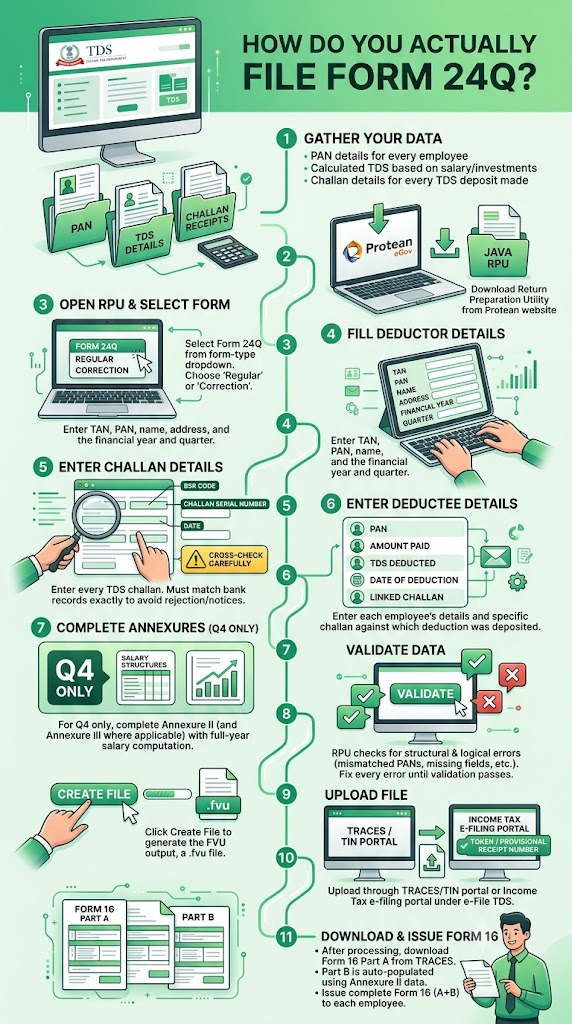
Filing is done through the NSDL/Protean Return Preparation Utility (RPU), validated, and then uploaded to the TRACES or Income Tax e-filing portal. Here is the process step by step.
- Step 1: Gather your data. You need PAN details for every employee, the calculated TDS for each based on their salary structure and declared investments, and the challan details for every TDS deposit made during the quarter.
- Step 2: Download the Return Preparation Utility (RPU) from the Protean eGov (formerly NSDL) website. This is a Java-based utility used to prepare the return offline.
- Step 3: Open the RPU and select Form 24Q from the form-type dropdown. Choose “Regular” for a first-time filing of that quarter, or select the correction option if you are revising a previously filed return.
- Step 4: Fill in the deductor details (TAN, PAN, name, address) and the financial year and quarter being filed.
- Step 5: Go to the Challan Details tab and enter every TDS challan for the quarter. The BSR code, challan serial number, and date must match your bank’s records exactly. This is the single most common reason for return rejection or defect notices, so cross-check these figures carefully against your actual challan receipts.
- Step 6: Go to the Deductee Details tab and enter each employee: PAN, amount paid, TDS deducted, date of deduction, and the specific challan against which that deduction was deposited.
- Step 7: For the Q4 return only, complete Annexure II (and Annexure III where applicable) with the full-year salary computation for each employee.
- Step 8: Click Validate. The RPU checks your data for structural and logical errors: mismatched PANs, challan amounts that do not reconcile, missing mandatory fields, and similar issues. Fix every error and warning until validation passes cleanly.
- Step 9: Click Create File to generate the FVU (File Validation Utility) output, a .fvu file that is what you actually upload.
- Step 10: Upload the file. This can be done either through the TRACES/TIN portal (tdscpc.gov.in) using your TAN login, or through the Income Tax e-filing portal (incometax.gov.in) under e-File > e-File TDS. After upload, you receive a token or provisional receipt number for tracking. The return is typically processed within a few days.
- Step 11: After the return is processed, download Form 16 Part A from TRACES for each employee (this is generated automatically once your Q4 return, including Annexure II, is processed). Part B, containing the salary breakdown, is auto-populated using the Annexure II data you submitted. Issue the complete Form 16 (Part A plus Part B) to each employee.
What Are the Due Dates for Issuing Form 16 After Filing Form 24Q?
Once your Q4 Form 24Q (with Annexure II) is filed and processed, you must issue the complete Form 16 to each employee by 15 June of the year following the financial year. For FY 2025-26, this means Form 16 must reach employees by 15 June 2026.
This sequencing matters: you cannot issue a valid Form 16 to employees before your Q4 Form 24Q has been filed and processed on TRACES, since Part A of Form 16 is generated directly from that filing.
Do You Need to File a NIL Return if No TDS Was Deducted?
Filing a NIL Form 24Q (a return declaring no TDS deducted for that quarter) is not a strict legal requirement. However, if your TAN has past TDS deposit history, or if the jurisdictional TDS Assessing Officer expects continuity in filings for your TAN, skipping a quarter’s return without any explanation can trigger a compliance notice asking why no return was filed. As a matter of good practice, filing a NIL return in quarters where no TDS was deducted (for example, if all employees fell below the taxable threshold that quarter) is recommended to maintain a clean, uninterrupted compliance record for your TAN.
What Penalties Apply for Late or Incorrect Filing?
Form 24Q compliance carries several distinct financial consequences, and it is worth understanding each separately.
Late deduction of TDS:
Interest at 1% per month is charged from the date the tax was due to be deducted until the date it was actually deducted.
Late deposit of deducted TDS:
Interest at 1.5% per month is charged from the date of deduction to the actual date of deposit with the government.
Late filing of the quarterly return itself (Section 234E):
A fee of ₹200 per day applies for every day of delay in filing the return, from the due date until the actual filing date, capped at the total TDS amount for that quarter. The portal will not even process your filing until this late fee has been deposited via challan; the return submission is rejected outright if the fee is unpaid.
Incorrect filing or continued non-filing (Section 271H):
Separately from the late fee, the Assessing Officer can levy a discretionary penalty ranging from ₹10,000 to ₹1,00,000 for failure to file the TDS statement within the prescribed time, or for furnishing incorrect information in the statement.
An important recent change to Section 271H relief:
For Assessment Year 2025-26 onward, the earlier relief window under Section 271H(3), which previously gave deductors a full year to file before this penalty applied, has been reduced to just one month. This means the Section 271H penalty can now be avoided only if the deductor pays the TDS, the applicable late fee, and interest, and files the statement within one month of the original due date. Beyond that one-month window, the discretionary penalty becomes a live risk. This is a meaningfully shorter grace period than employers may be used to from earlier years, and it is worth building into your internal compliance calendar.
How Do You Correct an Already-Filed Form 24Q?
Errors happen: a wrong PAN, a challan amount that does not match, a missed employee. Corrections are handled through the same RPU-based process:
- Log in to TRACES using your TAN.
- Go to Statement/Payment, then Request for Correction. Select the specific form, financial year, and quarter you need to correct.
- Download the consolidated file (the currently accepted version of your return, as processed by the department).
- Open this consolidated file in the RPU and make the necessary corrections.
- Validate, generate the corrected FVU file, and upload it as a correction statement (not a fresh “Regular” filing).
There is no limit on the number of correction statements you can file for a given quarter, though each correction must be filed sequentially, referencing the token number of the previous accepted statement for that quarter.
Form 24Q vs Form 26Q: What Is the Difference?
This distinction trips up many people handling payroll and vendor compliance together for the first time.
| Form 24Q | Form 26Q | |
| What it covers | TDS on salary payments | TDS on all other domestic, non-salary payments (contractor fees, professional fees, rent, interest, commission) |
| Governing section | Section 192 | Sections 193, 194, 194A, 194C, 194H, 194I, 194J, and others |
| Filed by | Employers | Any deductor making the specified non-salary payments |
| Annexures | Annexure I (all quarters), Annexure II and III (Q4 only) | No separate salary-style annexure structure |
| Certificate generated | Form 16 | Form 16A |
| Due dates | Same quarterly schedule as Form 26Q | Same quarterly schedule as Form 24Q |
If your organisation both pays salaries and makes payments to contractors, professionals, or landlords above the applicable thresholds, you will typically be filing both Form 24Q and Form 26Q every quarter, using the same TAN. For more on Form 26Q’s specific coverage, see our Form 16A guide, which explains the certificate generated from Form 26Q filings.
Are There Special Rules for Employees Who Worked Only Part of the Year?
Yes. If an employee joined or left mid-year, Annexure II treatment differs slightly. For the first three quarters, only Annexure I entries are needed for that employee, capturing the TDS deducted during the period they were actually employed with you. Annexure II, filed only in Q4, must still include the details of their remuneration for whatever period they actually served during the financial year, computed for that partial period, even if they left the organisation before the fourth quarter began. This ensures the full-year salary picture, even for a short-tenure employee, is captured correctly for Form 16 generation purposes.
If an employee left your organisation partway through the year, ensure your payroll or HR team still generates and issues a Form 16 covering their period of service, since the annual filing captures this regardless of their current employment status.
Important: Form 24Q Is Becoming Form 138
Under India’s Income Tax Act, 2025 (effective from 1 April 2026) and the accompanying Income Tax Rules, 2026, Form 24Q is being renamed Form No. 138. According to confirmed reporting on the new TDS/TCS form structure:
- Form 138 is used by employers for salary TDS under Section 392 of the Income Tax Act, 2025, corresponding to the old Section 192
- The employee-wise salary and TDS detail structure is retained
- Official guidance confirms Annexure I continues to be required for all four quarters, while Annexure II and Annexure III continue to be required only for Q4, mirroring the current Form 24Q structure
- Late filing under the new framework will attract fees and penalties under different section references (Sections 427, 461, and 465 of the new Act), rather than the current Section 234E and Section 271H
For FY 2025-26 (salary paid up to 31 March 2026):
Continue using Form 24Q exactly as described in this article, under the old Income Tax Act, 1961.
For Tax Year 2026-27 (salary paid from 1 April 2026 onwards):
Form 138 applies under the new framework. The core mechanics of quarterly filing, annexure structure, and TDS deduction under the salary head are expected to remain substantially the same, with updated section references and form numbering.
Frequently Asked Questions
1. Do I need to file Form 24Q if I have only one employee?
Yes, if TDS is being deducted from that employee’s salary under Section 192, the requirement to file Form 24Q applies regardless of how many employees you have. There is no minimum employee count exemption.
2. What if none of my employees’ salaries are high enough to require TDS deduction?
If no tax is deductible because taxable income does not exceed the basic exemption threshold, or because the tax payable after all deductions and rebates works out to nil, there is technically no mandatory return to file for that quarter. However, filing a NIL return is advisable if your TAN has any prior filing history, to avoid a compliance query about the gap.
3. Can I use one Form 24Q for multiple business locations or branches?
Generally, no. A separate Form 24Q must be filed for each TAN. If different branches of your organisation operate under different TANs (common in larger, decentralised organisations), each TAN requires its own separate quarterly filing.
4. What happens if I make an error in the challan details?
Mismatches between the BSR code, challan serial number, or deposit date entered in your return and what actually exists in the bank’s records are the most common reason for return rejection during validation. Always cross-check challan details against your actual bank-generated challan receipts before submission, not from memory or estimated figures.
5. My company deducted TDS correctly and deposited it on time, but the quarterly return itself was filed 45 days late. What is the penalty?
You would owe the Section 234E late fee of ₹200 per day for all 45 days of delay, capped at the total TDS amount for that quarter. Additionally, since the delay exceeds the current one-month relief window under Section 271H(3) for AY 2025-26 onward, a discretionary penalty of ₹10,000 to ₹1,00,000 becomes a live risk, at the discretion of the Assessing Officer, even though the tax itself was deposited on time.
6. Is Annexure III mandatory for every employer?
No. Annexure III specifically covers pension and certain senior citizen income scenarios within the Form 24Q framework. Most standard salaried-employee employers will only need Annexure I (every quarter) and Annexure II (Q4 only). Annexure III applies in more specific circumstances involving pension disbursement.
7. How soon after filing Q4 Form 24Q can I issue Form 16 to employees?
Once your Q4 return (including Annexure II) is processed on TRACES, Form 16 Part A becomes available for download, typically within a few days of successful filing. You then have until 15 June of the following year to issue the complete Form 16 (Part A and Part B) to each employee, though there is no requirement to wait until that deadline if your return is processed earlier.
Key Takeaways
- Form 24Q is the quarterly TDS return filed under Section 192 by any employer deducting tax at source from employee salaries, regardless of employee count.
- It has up to three annexures: Annexure I (filed every quarter, covering deductee and challan details), Annexure II (filed only in Q4, covering the full-year salary computation), and Annexure III (filed only in Q4, covering pension and specific senior citizen income cases).
- Annexure II data directly generates Part B of Form 16 for every employee, making Q4 accuracy especially critical.
- FY 2025-26 due dates: Q1: 31 July 2025, Q2: 31 October 2025, Q3: 31 January 2026, Q4: 31 May 2026.
- Filing requires the NSDL/Protean Return Preparation Utility (RPU), validated locally and uploaded as an FVU file via TRACES or the Income Tax e-filing portal.
- Penalties include ₹200/day under Section 234E for late filing (capped at TDS amount), plus interest for late deduction (1%/month) and late deposit (1.5%/month), and a discretionary ₹10,000 to ₹1,00,000 penalty under Section 271H if not resolved within one month of the due date for AY 2025-26 onward.
- Form 16 must be issued to employees by 15 June following the financial year, and can only be generated after the Q4 Form 24Q is successfully processed.
- From Tax Year 2026-27 (salary from April 2026 onward), Form 24Q is replaced by Form No. 138 under the Income Tax Act, 2025, retaining the same core annexure structure with updated section references.
Sources: Tax Garden: TDS Return Filing Guide, Form 24Q and 26Q for Employers and Businesses, May 2026; Busy: TDS/TCS Forms 24Q, 26Q, 27Q and 27EQ Explained, June 2026; Kredily: Form 24Q, Salary TDS Return, Due Dates and How to Generate It, March 2026; My Digital Filing: TDS Return Filing, Form 26Q, 24Q and 27Q Due Dates 2026, April 2026.
This article is for general information only and does not constitute tax or professional advice. For guidance specific to your payroll compliance, consult a practising Chartered Accountant.