

Quick summary: Have you found a mismatch in your Form 26AS, whether a missing TDS credit, a wrong amount, or an entry that does not match your Form 16 or Form 16A? The uncomfortable truth is that you, as the taxpayer, cannot directly edit or correct Form 26AS yourself. The error almost always originates in your deductor’s TDS return (Form 24Q, 26Q, 27Q, or 26QB), and only the deductor can file the correction that fixes it. This guide on how to correct errors in form 26AS explains exactly what causes these mismatches, the specific correction mechanism your deductor must use, how to escalate if they are unresponsive, and a genuinely important 2026 deadline that has just passed for several years of historical corrections.
Why Can’t You Just Fix Form 26AS Yourself?
Form 26AS is generated and maintained by the Income Tax Department based entirely on data that deductors (your employer, bank, tenant, or any other entity that deducted TDS from a payment to you) report through their quarterly TDS returns. You, as the person the tax was deducted from, have no direct edit access to this record. Your only role is to identify the discrepancy and push your deductor to correct it at the source.
This is why courts have consistently held that TDS credit is available to a taxpayer only to the extent it reflects in Form 26AS. If your Form 16 or Form 16A shows a certain TDS figure but Form 26AS shows something different or nothing at all, the department relies on Form 26AS, not your certificate, when processing your return. Claiming a TDS credit that is not reflected in Form 26AS is likely to be disallowed, regardless of how solid your Form 16 or Form 16A looks.
What Actually Causes a Form 26AS Mismatch?
Understanding the specific root cause helps you communicate the exact problem to your deductor, which speeds up the fix considerably.
Incorrect PAN entry.
If your bank, employer, or tenant quotes the wrong PAN while filing their TDS return, the credit gets linked to a different PAN (or no PAN at all), and does not appear in your Form 26AS. This is especially common for payments made to sole proprietors or individuals whose PAN was not carefully collected at the time of payment.
Challan mismatches.
If the challan BSR code, serial number, or deposit date was entered incorrectly in the deductor’s return, the underlying TDS deposit cannot be correctly mapped to the deduction record. TRACES shows the challan as “unmatched,” and the credit does not flow through to your Form 26AS, even though the money was genuinely deposited with the government.
Amount discrepancies.
If the deductor deposited, say, ₹1,20,000 via challan but the return itself reported only ₹1,00,000, your Form 26AS will show only the ₹1,00,000 that was actually reported in the return, not the full amount that was deposited.
Wrong section code.
If the deductor used the wrong TDS section (for example, entering Section 194C when it should have been Section 194J), this creates a classification mismatch that can affect how the credit is treated or matched during ITR processing.
Wrong assessment year.
If the deductor mentions the wrong assessment year while filing, say AY 2024-25 instead of AY 2025-26, the credit is posted to the wrong year entirely, making it appear completely absent from your current year’s Form 26AS.
Return filed for the wrong quarter.
If a deduction actually made in Q2 gets reported in the Q3 return instead, this creates a quarter mismatch that can affect your ability to claim the credit in the correct period.
The deductor has simply not filed their return yet, or filed it late.
Sometimes the TDS was genuinely deducted and even deposited correctly, but the deductor’s quarterly return itself has not yet been filed or processed. Until the return is filed and validated by TRACES, the credit will not appear in your Form 26AS at all, even though the tax was correctly withheld from your payment.
What Is the Step-by-Step Form 26AS Correction Process?
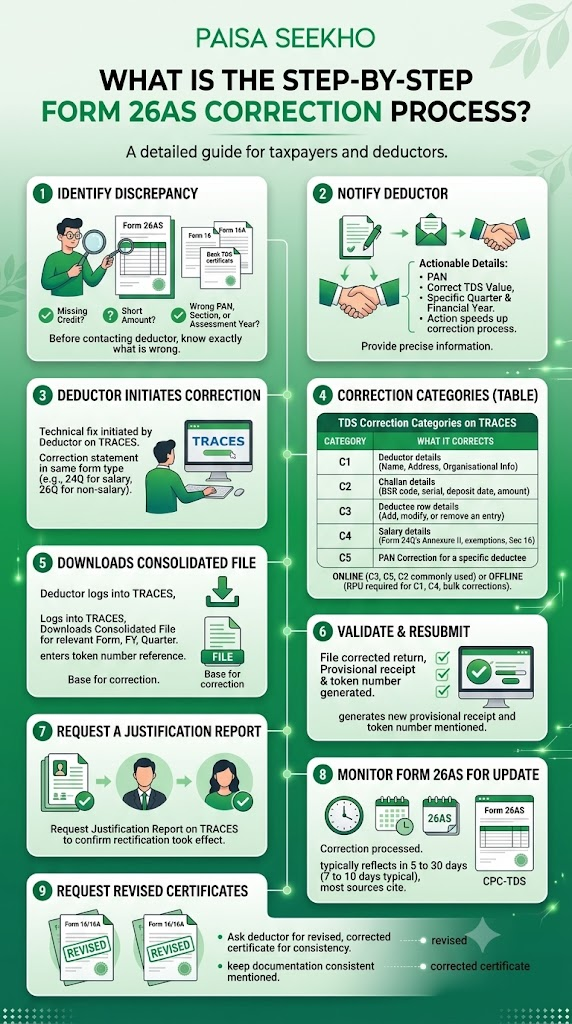
Step 1: Identify the specific discrepancy.
Before contacting your deductor, be precise about what exactly is wrong: is a credit missing entirely, is the amount short, or does an entry show under the wrong PAN, section, or assessment year? Compare Form 26AS carefully against your Form 16, Form 16A, or bank TDS certificate line by line.
Step 2: Notify the deductor with specific details.
Provide your PAN, the correct TDS value, and the specific quarter and financial year affected. Since the mistake is almost always on the deductor’s side, giving them precise, actionable information rather than a vague “my TDS is missing” significantly speeds up their internal correction process.
Step 3: The deductor files a correction statement on TRACES.
This is the actual technical fix, and it must be initiated by the deductor, not you. Correction statements are filed in the same form type as the original return (a correction to Form 24Q for a salary TDS error, Form 26Q for a non-salary TDS error, and so on), clearly marked as a correction rather than an original filing.
Step 4: The deductor may need to file under a specific correction category.
TRACES organises corrections into distinct types, each addressing a different kind of error:
| Category | What It Corrects |
| C1 | Deductor details (name, address, and similar organisational information) |
| C2 | Challan details (BSR code, serial number, deposit date, or amount) |
| C3 | Deductee row details (adding, modifying, or removing a specific deductee’s entry) |
| C4 | Salary details specifically within Form 24Q’s Annexure II (exemptions, HRA, Section 16 deductions) |
| C5 | PAN correction for a specific deductee |
Depending on the nature of the error, corrections can be filed either online directly through TRACES (commonly used for PAN updates, challan corrections, and deductee row changes) or offline using the Return Preparation Utility (RPU), which is mandatory for deductor-detail (C1) and salary-detail (C4) corrections, and also more practical for bulk corrections across many deductees at once.
Step 5: The deductor downloads the Consolidated File before making changes.
To file most corrections, the deductor first logs into TRACES, goes to Downloads, selects the Consolidated File for the relevant Form Type, Financial Year, and Quarter, and enters the token number of the latest accepted return for that period. This consolidated file, once downloaded, becomes the base on which the specific correction is made using the RPU.
Step 6: The corrected file is validated and resubmitted.
This generates a new provisional receipt and token number for that quarter’s corrected return.
Step 7: Request a Justification Report.
After the correction has been filed, the deductor (or you, if you have TRACES-registered access as a taxpayer) can request a Justification Report to confirm that the specific rectification has actually taken effect.
Step 8: Monitor Form 26AS for the update.
Once a correction is successfully processed, the corrected credit typically reflects in your Form 26AS within 5 to 30 days, with most sources citing 7 to 10 days as the more typical turnaround for straightforward corrections, though this can extend depending on the complexity of the error and current processing volumes at CPC-TDS.
Step 9: Request revised certificates.
If the original Form 16 or Form 16A you received reflected the incorrect figures, ask your deductor to issue a revised, corrected certificate as well, to keep your own documentation consistent with what now appears in Form 26AS.
What If Your Deductor Refuses or Is Unresponsive?
This does happen, and taxpayers do have a formal escalation path if a deductor is unwilling or unable to file the necessary correction.
Send a formal notice citing the relevant legal provisions.
You can formally notify the deductor in writing, referencing Section 200A and Section 201 of the Income Tax Act, which establish the deductor’s obligation to correctly report and deposit TDS.
File a complaint with the Jurisdictional Tax Officer.
Complaints can be lodged with the jurisdictional TDS Range officer covering the deductor’s location, formally flagging the non-compliance.
File your ITR without the disputed credit, and pursue the matter separately.
If time is running out and the correction has genuinely not come through, you can file your return claiming only the credit that is actually visible in Form 26AS, and separately pursue the deductor for the shortfall, potentially including through legal means if the amount involved is significant.
Note the consequence for the deductor.
A deductor who fails to file a required correction statement can themselves face a penalty under Section 271H, which is a meaningful incentive for them to cooperate once they understand the compliance risk on their own side, not just the inconvenience they are causing you.
What Should You Do If the Deadline Is Approaching and the Correction Has Not Come Through?
If you are close to your ITR filing deadline and the corrected credit has still not appeared in Form 26AS, you generally have two practical choices:
- Option 1: File now, claiming only what Form 26AS actually shows, and plan to file a revised return under Section 139(5) once the correction is reflected, provided your original return was filed on or before the due date and the revised return is filed within the applicable window for that assessment year.
- Option 2: Wait for the correction before filing, if you have some buffer before the deadline and reasonable confidence the deductor will act quickly. This avoids the extra step of a revised return but carries the risk of missing your own filing deadline if the correction is delayed further.
Neither option is risk-free, and the right choice depends on how close you are to your own deadline and how responsive your deductor has been so far.
What Happened on 31 March 2026, and Why Does It Matter Now?
This is a genuinely important, time-sensitive development that affects a specific band of historical financial years.
TDS correction statements for FY 2018-19 through FY 2022-23 became permanently time-barred on 31 March 2026, under the limitation period established by Section 200 of the Income Tax Act. After that date, deductors can no longer file correction statements for these five specific financial years on TRACES, meaning any unresolved PAN errors, challan mismatches, amount discrepancies, or wrong section codes from that entire window are now permanently unrectifiable through the standard TRACES correction mechanism.
Why this matters even though the deadline has already passed:
If you are a taxpayer with a genuine, still-unresolved TDS credit shortfall traceable to any of these five years, the standard correction route is now closed. Deductors who missed this window remain exposed to potential Section 201 demand notices, 1.5% per month interest, and Section 40(a)(ia) expense disallowance for the underlying default, and affected taxpayers may need to pursue alternative remedies, such as a formal representation to the Assessing Officer, rather than relying on a straightforward TRACES correction statement.
The forward-looking change that replaces the old rule:
From 1 April 2026, a new, standing time limit applies to all correction statements going forward: corrections are not accepted after 2 years from the end of the financial year in which the original statement was filed. This is a meaningful shift from the earlier framework and gives both deductors and taxpayers a clear, predictable window within which any error must be identified and corrected, rather than relying on periodic, ad hoc time-bar deadlines.
The practical lesson for taxpayers going forward:
Do not sit on a known TDS mismatch. With the new 2-year correction window now firmly in place from April 2026, unresolved errors that drift past this window will become permanently uncorrectable in exactly the way the FY 2018-19 to FY 2022-23 band just became on 31 March 2026.
How Can You Reduce the Chances of a Mismatch in the First Place?
Check your Form 26AS monthly, not just at ITR filing time.
Waiting until July to check a full year’s worth of TDS entries means any errors discovered then have far less runway to be corrected before your filing deadline. Regular monthly monitoring, especially for salaried employees and anyone with multiple sources of TDS-bearing income (FD interest, rent, freelance fees), catches problems early. Our Form 26AS vs AIS vs TIS guide covers how to read and cross-check these statements systematically.
Cross-check every entry against your actual certificates.
Compare each Form 26AS entry against your Form 16 (for salary), Form 16A (for other TDS), or bank-issued TDS certificates, rather than assuming the figures automatically align.
Claim only matched credits.
Never claim a TDS credit in your ITR that does not appear in Form 26AS, even if your Form 16 or Form 16A clearly shows the deduction. As covered above, the department relies on Form 26AS, and an unmatched claim risks disallowance and a demand notice.
Verify your PAN is correctly on file with every deductor.
Since PAN errors are among the most common causes of missing credits, proactively confirming your PAN is correctly recorded with your employer, bank, and any tenant deducting TDS on rent paid to you, reduces the chance of this specific error occurring in the first place.
Is Form 26AS Changing Under the New Income Tax Act?
Yes, in name though not in fundamental purpose. With the implementation of the Income Tax Act, 2025 from 1 April 2026, Form 26AS has been renumbered as Form 168. The correction mechanism, the deductor-driven nature of fixes, and the overall importance of reviewing this statement before filing remain substantially unchanged; only the form number and, from that date, the new 2-year correction time limit discussed above apply going forward.
For FY 2025-26 (AY 2026-27): you will still be working with Form 26AS as described throughout this article, since this covers income and TDS from before the transition date.
Frequently Asked Questions
1. Can I edit or correct my own Form 26AS if I spot an error?
No. Form 26AS is generated entirely from data reported by your deductors through their quarterly TDS returns. You cannot directly edit any entry yourself. Your role is limited to identifying the discrepancy and requesting your deductor to file the necessary correction statement on TRACES.
2. My bank deducted TDS on my FD interest, but it is not showing in Form 26AS at all. What should I do?
Contact your bank immediately, providing your PAN, the correct TDS amount, and the specific quarter affected. The most common causes are an incorrect PAN entry by the bank, a challan mismatch, or the bank simply not having filed or processed its quarterly TDS return (Form 26Q) yet for that period.
3. How long does it take for a correction to reflect in Form 26AS after the deductor files it?
Typically 5 to 10 working days for straightforward corrections once the deductor’s correction statement is successfully validated, though this can extend up to around 30 days in some cases depending on the nature of the error and processing volumes.
4. What if my employer refuses to file a correction even after I have pointed out the error?
You can send a formal notice citing Section 200A and Section 201 of the Income Tax Act, file a complaint with the jurisdictional TDS Range officer covering your employer, or, if the deadline is pressing, file your ITR claiming only the credit actually visible in Form 26AS and pursue the shortfall separately. Your employer also faces a Section 271H penalty risk for failing to file a required correction.
5. Is it too late to fix a TDS error from FY 2019-20?
Yes, if the correction had not already been filed before 31 March 2026. TDS correction statements for FY 2018-19 through FY 2022-23 became permanently time-barred on that date under the Section 200 limitation period, meaning the standard TRACES correction mechanism is no longer available for those specific five financial years.
6. What is the new time limit for TDS correction statements going forward?
From 1 April 2026, correction statements are not accepted after 2 years from the end of the financial year in which the original statement was filed. This replaces the earlier framework and applies as a standing rule for all TDS returns filed from that point onward.
7. Can I file a revised ITR after my TDS mismatch is finally corrected in Form 26AS?
Yes. You can file a revised return under Section 139(5), provided your original return was filed on or before the due date, and the revised return itself is filed within the applicable window for that assessment year, which for AY 2026-27, following the extended timeline introduced by Budget 2026, runs until 31 March 2027.
Key Takeaways
- You cannot directly correct Form 26AS yourself. Every entry originates from your deductor’s quarterly TDS return, and only the deductor can file the correction that fixes an error.
- Common causes include incorrect PAN entry, challan mismatches, amount discrepancies, wrong section codes, wrong assessment year, and quarter misreporting, almost always originating on the deductor’s side rather than yours.
- Corrections are filed through TRACES, using one of five categories: C1 (deductor details), C2 (challan), C3 (deductee), C4 (salary detail in Form 24Q), and C5 (PAN correction), either online directly on the portal or offline via the Return Preparation Utility.
- Corrections typically reflect in Form 26AS within 5 to 10 working days, though this can extend depending on complexity.
- If a deductor is unresponsive, you can escalate through a formal notice citing Sections 200A and 201, a complaint to the jurisdictional TDS officer, or file your ITR with only the matched credit and pursue the shortfall separately.
- TDS correction statements for FY 2018-19 through FY 2022-23 became permanently time-barred on 31 March 2026. From 1 April 2026, a new standing rule limits all corrections to 2 years from the end of the financial year in which the original statement was filed.
- Form 26AS is renamed Form 168 under the Income Tax Act, 2025, effective 1 April 2026, though the correction mechanism and its importance remain fundamentally unchanged.
Sources: Terra Insight: TDS Correction Statement March 2026 Deadline, FY 2018-23 Time-Bar; Tax Garden: TDS Return Correction Online, Step-by-Step Guide for 24Q, 26Q, 27Q via TRACES, 2026; ClearTax Advisors: TDS Mismatch Form 26AS, Causes and How to Fix FY 2025-26, March 2026; Ebizfiling: Errors and Corrections in Form 26AS of Income Tax Act.
This article is for general information only and does not constitute tax or professional advice. For guidance specific to your TDS correction, consult a practising Chartered Accountant.
Last Updated on 1 month ago by Team Paisaseekho